What does a planning specialist do?
DepartmentCollection and merchandise planningModuleSRM
The planning specialist is the person at a fashion brand who plans which product goes to which store and channel, when and in what quantity, and balances stock with sales.
 Card: Locked · your progress is saved in this browser · save it to your account
 PIMLAND 03 · SRM
Planning specialist
Collection and commercial planningPlanning specialist, in brief
When the right product is on the right shelf, in the right size, at the right time, sales flow on their own.
- Splits the season's buy plan across store, e-commerce and marketplace channels.
- Sets up the initial allocation and closes size gaps with replenishment and store-to-store transfers.
- Season rhythm: channel split, delivery calendar, initial allocation, weekly replenishment, markdown, plan comparison.
- The most important documents are the buy plan, size profiles, the initial allocation table and the replenishment list.
- Set the total quantity from the store group, and the size breakdown from the store's own size profile.
- Judged by sell-through by channel, sell-out by size and stock turnover.
- Buy plan and order quantity table
- Store groups and size profiles
- Initial allocation table
- Replenishment and transfer list
 Merchandiser
 Sourcing / purchasing specialist
 Store sales associate
Read in detailall documents, workflow, cases
- Splits the season's buy plan across store, e-commerce and marketplace channels: which store will take how many units of which style.
- Sets up the initial allocation: shares out the product arriving at the warehouse according to each store's size, sales history and size profile.
- Handles replenishment: sends product from the warehouse or from another store to the store and channel that is selling, closing size gaps.
- Tracks the delivery dates of supplier orders; reports the effect of a slipping delivery on the sales calendar to the merchandiser and purchasing.
- Prepares the weekly sales, stock and stock turn report; provides data for inter-store transfer and markdown decisions.
In a season
- Pre-season
The buy plan's split by channel and store. Stores are grouped by sales history and size profile.
- Delivery calendar
The delivery dates of supplier orders go into the calendar; the week each drop enters the warehouse becomes clear.
- Season launch
Initial allocation: the product arriving at the warehouse is shared out to the stores and the e-commerce warehouse.
- In season
Replenishment and store-to-store transfers every week. Sizes that sell and stock that sits are read separately.
- Sale period
Remaining stock is pulled together at certain points; a stock report by store is prepared for the markdown decision.
- End of season
Plan is compared with actual; size profiles and store groups are updated for the next season.
Who do they work with?
- Merchandiser
- Sourcing / purchasing specialist
 Production follow-up coordinator
 E-commerce specialist
- Store sales associate
 Collection manager
From school to work
| What you learned at school | At work |
|---|---|
| In statistics, you learn to calculate averages, distributions and percentages. | In working life, these come up every morning: a store's size breakdown, a style's weekly sales average, stock turnover. Same formula, real data. |
| You get to know Excel's basic formulas and tables. | In working life, Excel becomes your main tool: pivot tables, VLOOKUP, conditional formatting. Of the 13 planning ads among the 242 job ads in Turkey we reviewed, 11 ask for Excel. |
| You learn that a collection moves along a season calendar. | In working life, you are at the other end of the calendar: the week the product enters the warehouse, the day it goes out to stores, the timing of the second shipment. |
| You learn a product's size run and size range. | In working life, every store has its own size profile. Of the same style, one store gets more small sizes, another more large sizes. |
| You get to know the basic concepts of supply chain and logistics. | In working life, these concepts turn into a table: the supplier's delivery date, the warehouse's receiving capacity, the day goods ship to the store. When one slips, you rearrange the others. |
What do job ads ask for?
From 242 fashion and retail job ads published in Turkey in August–October 2026.
Sales data and analytics
It appears in 12 of the 13 planning ads among the 242 job ads in Turkey we reviewed. Across the whole set of ads it is also first, at 58%.
Excel
In 11 of the 13 planning ads; 38% across all 242 ads. 5 planning ads ask for ERP or a similar system by name.
Season calendar and supplier follow-up
Of the 13 planning ads, 7 mention the season calendar and delivery dates, and 7 mention coordination with suppliers and manufacturers. Alongside the spreadsheet, planning also manages the calendar of incoming goods.
English
In 6 of the 13 planning ads. There are also ads with English titles such as planner and supply planner.
Entry point
12 of the 13 planning ads are non-managerial, and 3 have entry-level titles (assistant, staff). One planning specialist ad openly invites new graduates: '0–3 years of experience; recent graduates are welcome'.
The first 90 days
- Learn the store list and store groups: which store is big, which one is strong in which category.
- Read the weekly sales and stock report in the same order every week; separate the sizes that sell from the stock that sits.
- Follow a product's path from start to finish: from the supplier order to the warehouse, from the warehouse to the store and the e-commerce warehouse.
Which field of study?
Industrial engineering, business administration, statistics, economics and textile engineering are common. Here, being comfortable with numbers matters as much as the name of your department. Most people start as a planning assistant or planning clerk; store experience is valuable for understanding the language of the store.
Getting the right product, in the right size, to the right shelf at the right time.
From the inside: documents, decisions, cases
Documents, handovers, decisions and mistakes that happen on the job.
A working day
- 09.00
You open the weekend sales report: broken down by store, style, color and size. You separate the sizes that sold and the product sitting in stock into two lists.
- 09.45
You prepare the replenishment list: how many units of which size go to which store. You have the warehouse team confirm whether there is enough stock in the warehouse.
- 10.30
You check the delivery status of supplier orders. One order's delivery has slipped; you ask purchasing for the new date.
- 11.30
You work out the impact of the slipped delivery: which store's window was waiting for this product, and what can go from stock instead. You write a short note to the merchandiser.
- 13.30
You talk with the store side: a style is selling fast in one store and sitting on the shelf in another. You propose a store-to-store transfer.
- 14.30
You discuss the stock share with the e-commerce team: is there enough online stock for the products going into the campaign, and should extra product be pulled to the e-commerce warehouse?
- 16.00
You set up the initial allocation table for the next drop: store groups, size profiles, window quantities.
- 17.00
At the end of the day, you send the shipping list to the warehouse. You mark the lines that changed; the warehouse always works with the latest version.
A sample day; hours vary by company and season.
Workflow: before you, after you
- 1Split the buy plan across channels and store groups
- Input
- Order quantity table, last season's sales by channel and store
- Output
- Quantity plan by channel and store group
- Handover
- Merchandiser
- 2Set up the delivery calendar
- Input
- Supplier orders, season calendar
- Output
- Weekly warehouse receiving plan
- Handover
- Sourcing / purchasing specialist
- 3Set up the initial allocation
- Input
- Warehouse receiving plan, store groups, size profiles
- Output
- Initial shipping list by store
- Handover
- Store sales associate
- 4Set aside the e-commerce stock share
- Input
- Campaign calendar, online sales rate
- Output
- List of stock set aside for the e-commerce warehouse
- Handover
 E-commerce operations specialist
- 5Replenish every week
- Input
- Weekly sales and stock report
- Output
- Replenishment and transfer list
- Handover
- Store sales associate
- 6Replan the slipped delivery
- Input
- Delivery status, production follow-up note
- Output
- Updated shipping plan, suggestion for a product that can go instead
- Handover
- Merchandiser
- 7Write the end-of-season review
- Input
- The season's sales, stock and transfer data
- Output
- Plan-versus-actual report, updated size profiles and store groups
- Handover
 Middle manager
Documents that pass through your hands
| Document | From | To | When | What for |
|---|---|---|---|---|
| Buy plan and order quantity table | Merchandiser | Planning specialist | Pre-season | The total quantity and size assortment to be split across channels and store groups. |
| Supplier order and delivery list | Purchasing | Planning specialist | Throughout the season, every week | Which product enters the warehouse in which week; the allocation calendar leans on this. |
| Store list, store groups and size profiles | Planning specialist, together with the store side | Planning specialist and merchandiser | Updated before the season | Store size, strongest category and size breakdown; allocation is done by these groups. |
| Initial allocation table | Planning specialist | Warehouse and stores | Before the product enters the warehouse | Initial shipping quantity by style, color, size and store. |
| Replenishment and transfer list | Planning specialist | Warehouse, stores and e-commerce operations | Every week | Products going to the store or channel that is selling, from the warehouse or from another store. |
| Weekly sales, stock and stock turnover report | Planning specialist | Merchandiser and middle manager | At the start of every week | The gap between plan and actual, stock that sits, transfer and markdown proposals. |
Decisions
- Setting a store's initial allocation quantity and size breakdownApproved by: You set it up; the total quantity stays within the merchandiser's buy plan.
- Proposing a store-to-store transferApproved by: You propose; it is finalized once the store side and warehouse capacity confirm.
- Sending another product from stock to the window in place of a late productApproved by: You decide together with the merchandiser; the store team is informed in writing.
- Pulling remaining stock together in certain stores or a channel for markdownApproved by: The proposal is yours; the decision is the middle manager's.
What are you evaluated on at work?
- Sell-through by store and channel
- Sell-out and lost sales by size
- Stock turnover and stock sitting in the warehouse
- Store-to-store transfers and returned product
- The allocation plan reaching the warehouse on time
Common mistakes on the job
Allocating by the store's total sales without looking at its size profile.
ResultThe store gets the right quantity, but the sizes land wrong; small sizes run out in one store while large sizes sit in another.
PreventionSet the total quantity from the store group, and the size breakdown from the store's own size profile.
Updating the shipping list and leaving the old version at the warehouse.
ResultThe warehouse picks with the old quantities; the product goes to the wrong store and has to come back through a transfer.
PreventionPut a date and version on every list; mark the changed lines and withdraw the old version.
Setting aside the e-commerce stock share without checking the campaign calendar.
ResultOn campaign day, online stock runs out early while the same product sits in stores.
PreventionGet the campaign calendar from the e-commerce team every week; review the share before the campaign.
Leaving a slipped delivery date only to purchasing's follow-up.
ResultThe product planned for the store doesn't arrive on time, and the window plan is left empty.
PreventionCheck the delivery status yourself every week too; if something slips, write its impact to the merchandiser the same day.
Copying store codes and stock codes by hand.
ResultA single wrong digit sends the product to another store or in another color.
PreventionPull codes from the system; double-check every line you enter by hand.
Case: what would you do?
Case 1A new jacket's delivery has slipped; it was planned for the windows of several large stores during the holiday week, and the first lot will only just make it to that week.What do you do?
A good answerYou send the first lot that arrives to the large stores with a window plan first, and send the other stores theirs in the second shipment. For the stores that won't make the window, you suggest a similar product from stock together with the merchandiser and inform the store team of the change in writing.
If the delay is split equally across all stores, every store is short. Giving priority to where sales and the window will be hit hardest makes the loss smaller.
Case 2A pair of trousers sold out in small sizes at one store early in the season; at another store, the same sizes are sitting on the shelf.What do you do?
A good answerYou put the two stores' size sales side by side. You propose transferring the waiting sizes to the store that is selling them, and update the first store's size profile for the next allocation.
The transfer saves today's sales; the profile update stops the same thing from happening again next season.
Case 3The e-commerce team wants to increase a dress's online stock for a weekend campaign; the dress is also selling well in stores.What do you do?
A good answerYou compare online and in-store sales rates in the same table. You set aside a share of the warehouse stock for the campaign and adjust the stores' replenishment calendar to match. You put the decision in writing together with the merchandiser and the e-commerce team.
Stock is a single pool; every product that goes to one channel is taken from the other. The sales rate sets the share.
Think of your own answer first, then open it.
How does this position work with the world?
The everyday language of planning is largely English: allocation, replenishment, sell-through, stock cover, store clustering. 6 of the 13 planning ads reviewed ask for English; a specialist planning the Turkey stores of an international brand discusses the same report with headquarters in the same terms. When the product record is born in PLM and moves through SRM and PIM with the same stock code, delivery date, variant and channel information stays the same for everyone; this record is the shared language of planning.
What changes with PLM?
| Before | With PLM |
|---|---|
| Delivery dates sit in purchasing's file and the allocation plan in yours; when a date slips, you hear about it by e-mail. | The delivery status of the supplier order is visible in the system; the moment something slips, you rebuild the allocation plan. |
| Stock codes and product groups are written differently in every team's spreadsheet; reports are matched by hand. | There is one product record; the stock code, season and product group look the same in every report. |
| The season calendar sits in a presentation file, and the shipping weeks in a separate spreadsheet. | The season calendar, special days and process deadlines are in the same calendar; you build the shipping plan backward from the calendar. |
Career path
- Planning assistant or planning staff
- Planning specialist
- Senior planning specialist
- Middle manager (planning or supply chain)
Glossary for this position
- Sell-through (sales rate)
- The ratio of units sold in a period to units offered for sale in the same period.
- Markdown (discount)
- Lowering the price of a product whose sales fall below expectations.
- SKU (stock keeping unit)
- The code that uniquely identifies each product option held in stock.
- Variant
- Each sellable option of the same style, distinguished by attributes such as color and size.
- Barcode
- The sequence of code and bars that lets a product option be read by machine at the checkout, in the warehouse and during stock counts.
- Delivery date
- The date by which a task, material or order must be delivered.
- Drop
- Releasing a collection for sale in parts on set dates, rather than all at once.
- Season (SS/AW)
- Grouping collections by selling period: Spring/Summer (SS) and Autumn/Winter (AW).
- Line plan
- The collection plan showing, for each category of a season, how many styles, which price band, how many colors and what quantity will go out.
- Critical path
- A chain of linked tasks where any delay directly pushes back the launch.
- ERP
- Enterprise resource planning: the system that records the company's operations such as stock, sales, purchasing and accounting.
What does the work look like on screen?
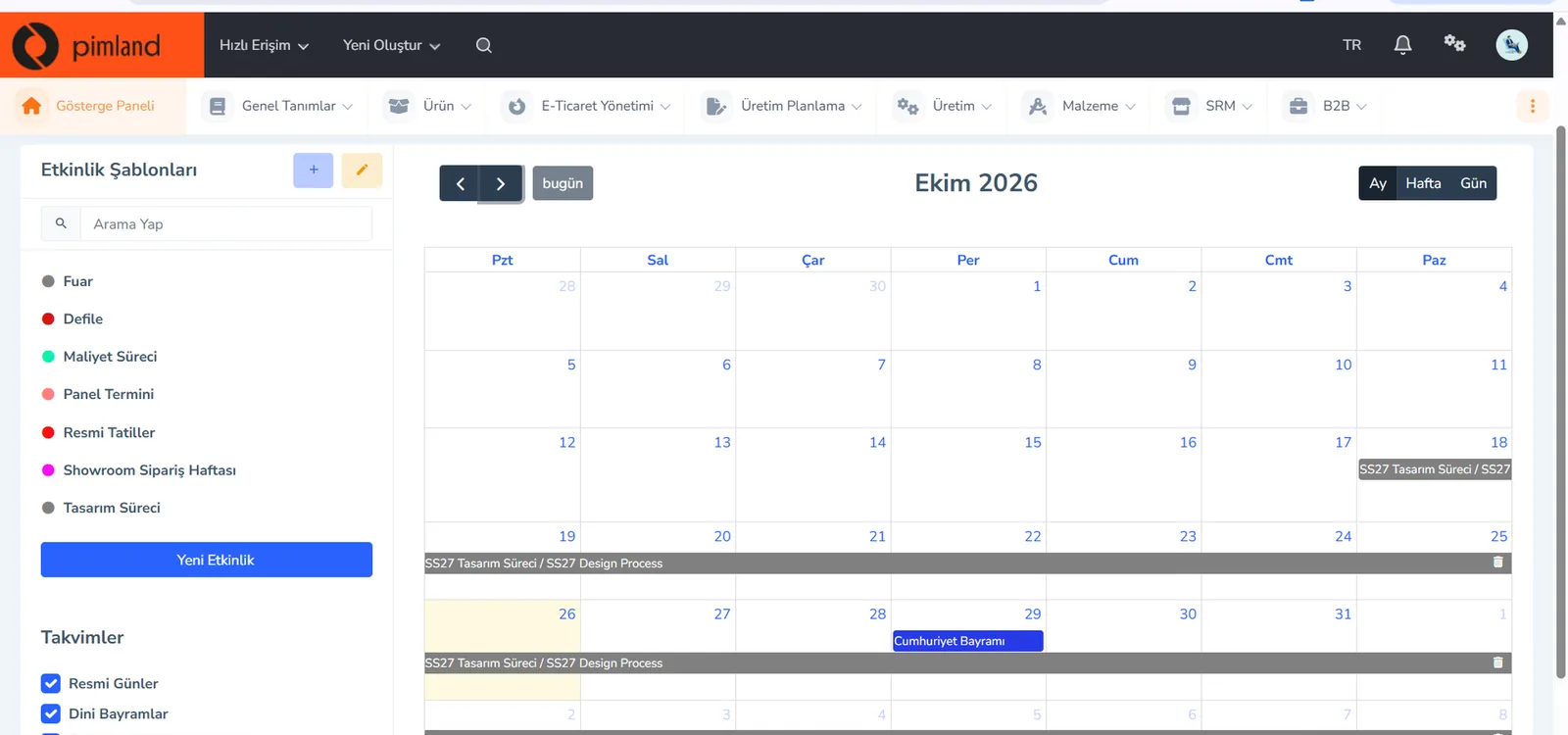
A planning specialist's first stop in Pimland is the calendar: when the product will arrive. Then the supplier orders and the list of variants going on sale.
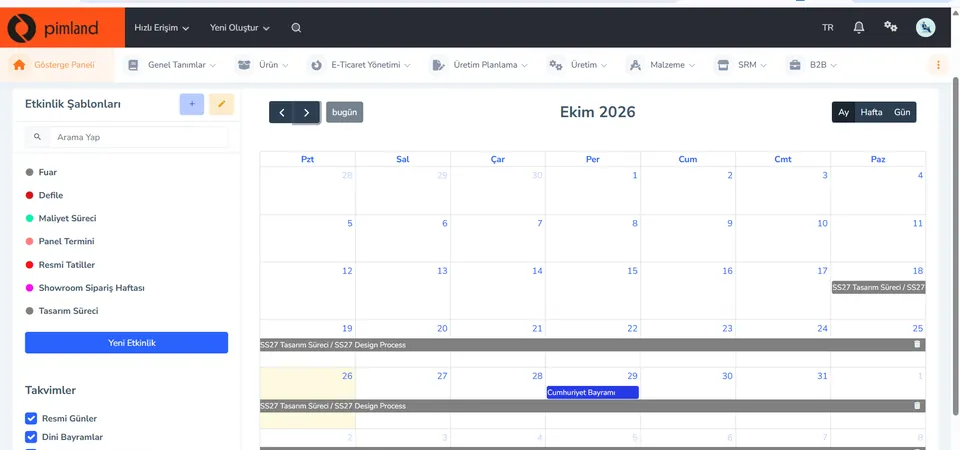
Screen from the demo environment; brands and amounts are demo data. Step 1Read the season calendar
Event templates are on the left: trade fair, fashion show, costing process, panel deadline, showroom order week, design process. You open the calendar in month, week or day view; public holidays are in the same calendar.
In real working life, holiday and special-day weeks are also the calendar of the allocation plan. The product needs to be in the store before that week; you build the shipping plan backward from the calendar.
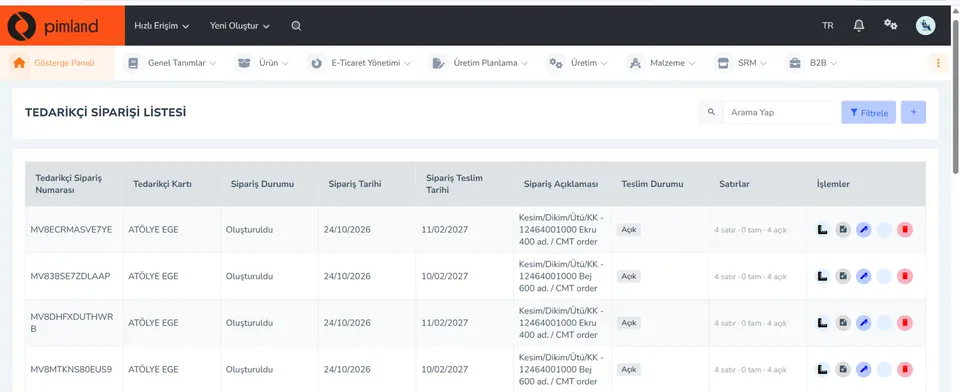
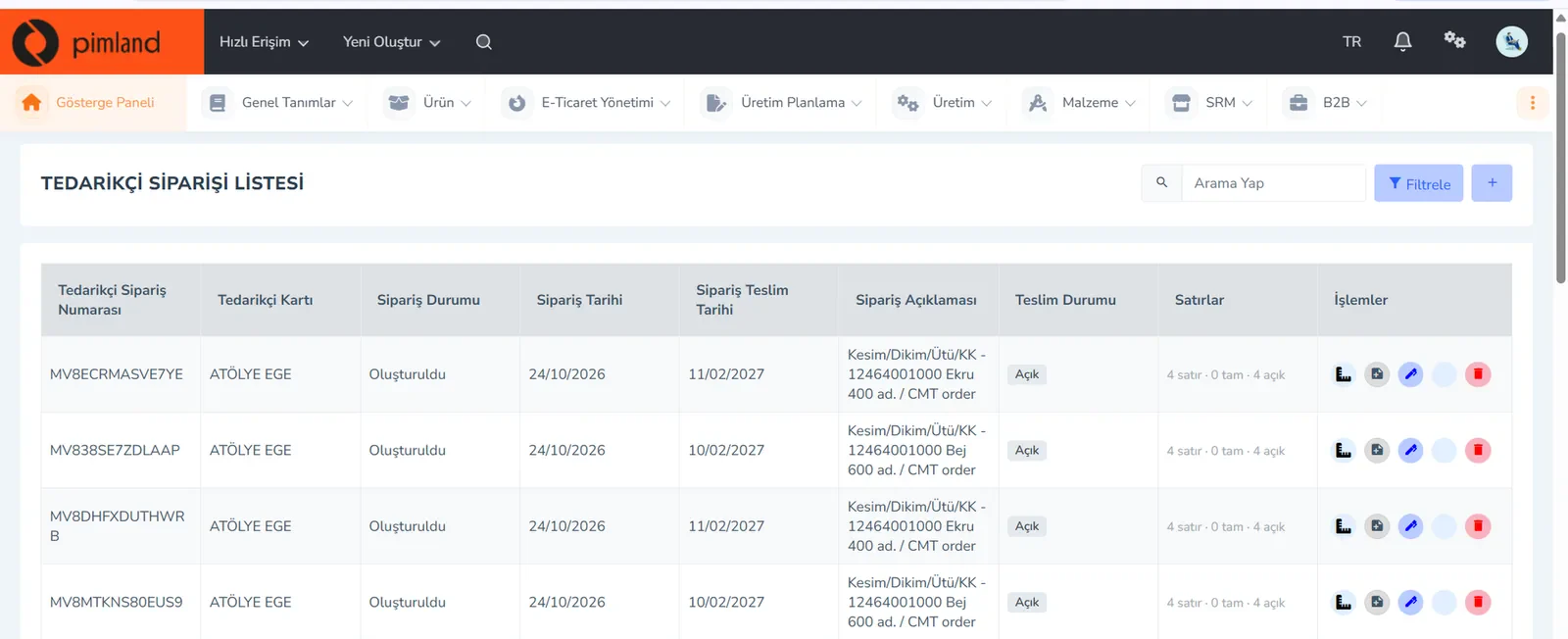
Screen from the demo environment; brands and amounts are demo data. Step 2See incoming goods in supplier orders
The supplier order list shows the order number, supplier card, order status, order and delivery dates, description, delivery status and lines. The lines column shows how many lines are complete and how many are still open.
In real working life, the allocation plan leans on the delivery date. An order with many open lines tells you early that you need to shrink the first shipment or change the store order.
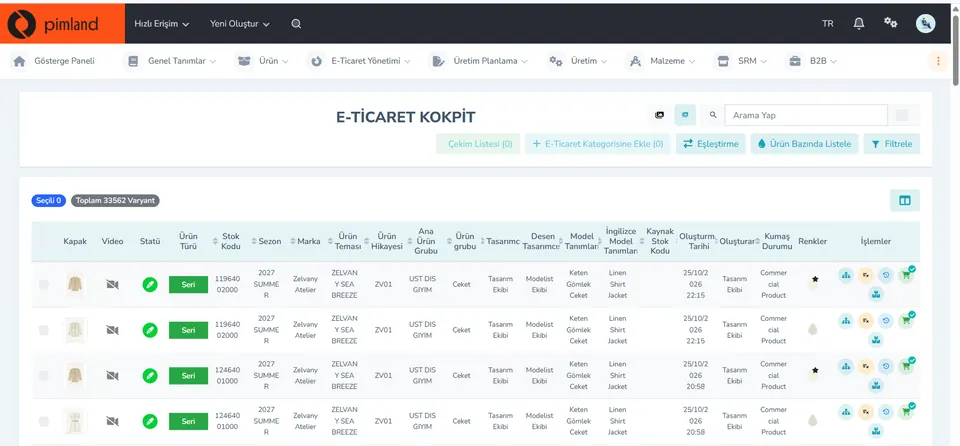
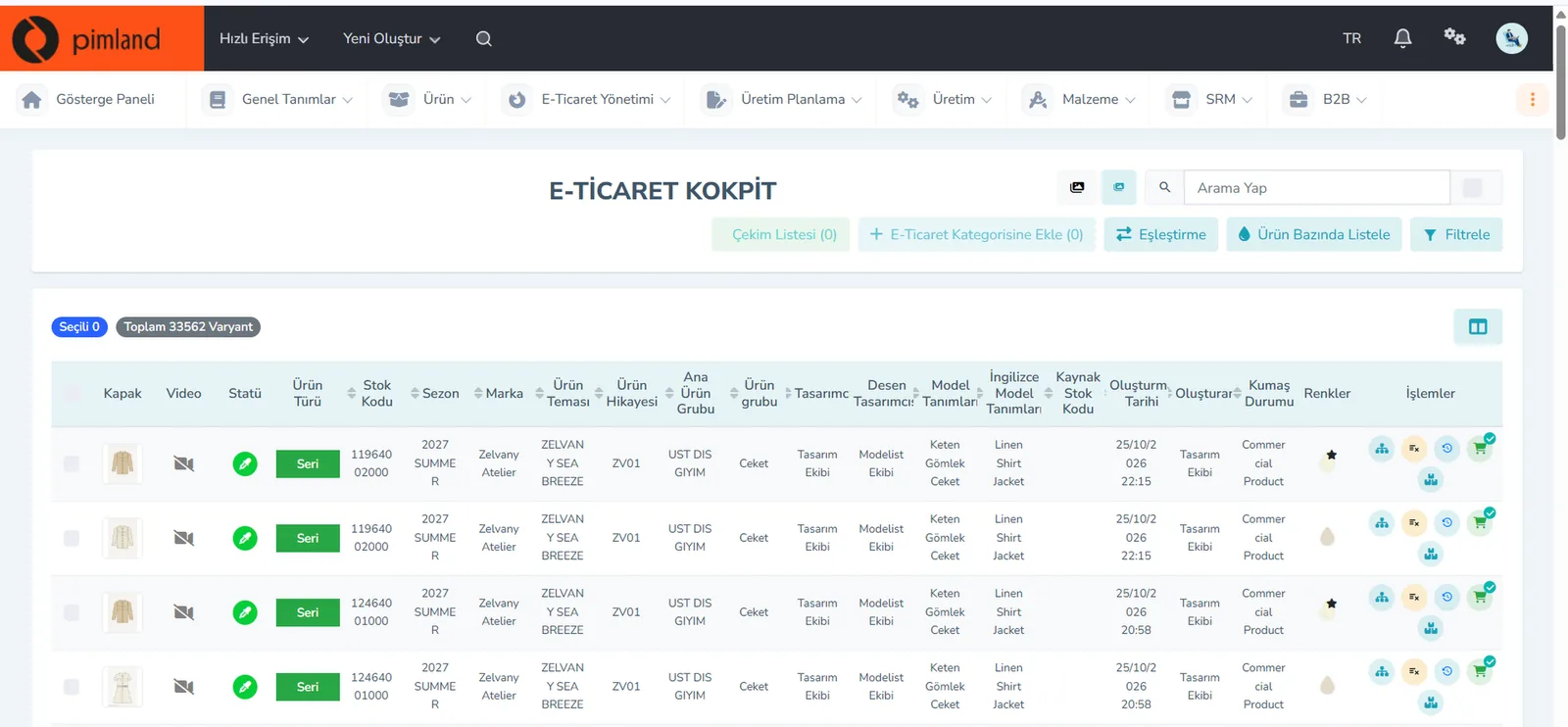
Screen from the demo environment; brands and amounts are demo data. Step 3List the variants going on sale
The cockpit lists products by variant: cover image, status, product type, stock code, season, brand, product theme, main product group, product group, colors. At the top are the total number of variants, filters and a 'list by product' option.
In real working life, allocation is done at variant level: not the style, but color and size. Reading the stock code correctly is the first step to getting every color to the right store.
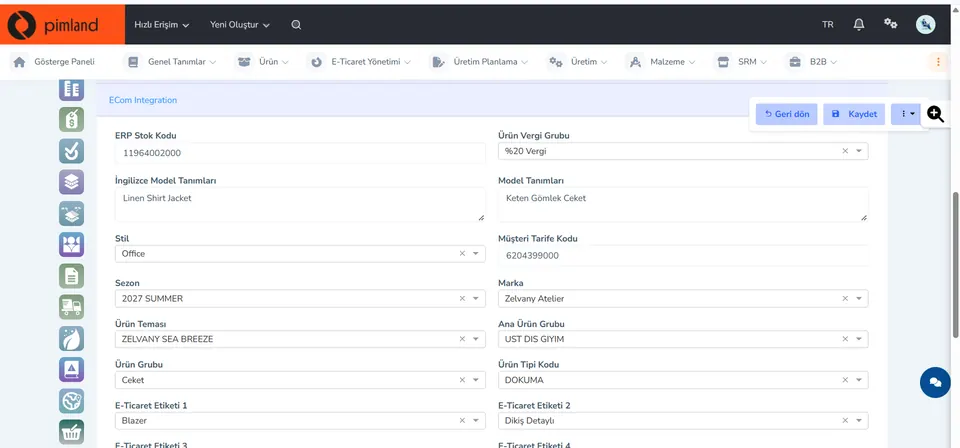
Screen from the demo environment; brands and amounts are demo data. Step 4Know the fields you will break the report down by
On this tab of the product card, fields such as ERP stock code, season, brand, theme, product group and style sit side by side. You use these fields when you break the sales and stock report down by category and season.
In real working life, store reports are rolled up by these fields. When the product group is written the same way in every record, allocation by category is also set up correctly.

These screens are from the Pimland SRM module.
Open your card
Open your card
Read the short summary and the Pimland screens and answer at least 2 of 3 questions correctly to open the card. When all 20 cards are open, your Pimland Basic Certificate arrives in your account automatically.
How fashion, retail and manufacturing companies work, and 20 position cards
First the required reading, then the cards for 20 positions: you learn how a fashion company works.
- FirstTraining 1: How is a product born? · read to the end and complete it
- Each cardA summary of the position, audio narration and Pimland screens
- Card3 short questions at the end of each part; 2 correct answers open the next part · no time limit
- AccountWith a free account, your progress follows you on every device
- At the endOnce you complete all 20 cards, the Pimland Basic Certificate arrives in your account automatically
Certificate 1 · Pimland Basic Certificate
Reading is open to everyone; the part questions and the certificate require an Academy account.
PLM, PIM and SRM trainings
The shared language of the fashion world: PLM, PIM and SRM, with Pimland's real screens.
- OrderFirst PLM, then PIM, then SRM · one at a time
- Each training8 parts, in order · audio narration and Pimland screen
- Questions3 questions at the end of each part, 24 in total · 2 correct answers open the next part · no time limit, the questions change with every attempt
- UnlockPart questions open after your Basic certificate
- Verification14+ (date of birth in your profile); an e-Devlet education document for Turkish nationals
- At the endOnce the three trainings, ID and document are complete, Certificate 2 arrives in your account
Certificate 2 · Pimland PLM · PIM · SRM Certificate
Reading is open to everyone; the part questions and the certificate require an Academy account.
PRO · advanced training
Separate application, for selected candidates.
- WhoCandidates selected from applicants who hold both certificates
- OnlinePimland PLM software training and test
- On site1 day inside a fashion company, seeing PLM in use
- ApplicationWith “Apply for PRO training” on the PRO page; places are limited, and selected candidates hear back by email
Certificate 3 · Pimland PRO Certificate
Reading is open to everyone; the part questions and the certificate require an Academy account.
FAQFrequently asked questions about planning specialists
4 questions
In fashion retail, plans which product goes to which store and channel, when and in what quantity. At the start of the season sets up the initial allocation; during the season replenishes the stores that are selling and balances stock with sales.
Allocation is the initial distribution: sharing out new product arriving at the warehouse among stores and channels. Replenishment is restocking: sending a new unit from the warehouse or from another store to replace the one that was sold.
The merchandiser plans which product will be bought for the season, in what quantity and at what price. The planning specialist plans which store and which channel the bought product will go to, and when. One is on the buying side, the other on the distribution side; both work with the same sales data.
Excel, basic statistics and reading sales data. Job ads also often ask for season calendars, tracking supplier deliveries and English. Knowing the product and the sizes helps you interpret the numbers correctly.
· Pimland Academy team