How do you become a stylist?
DepartmentMarketing and e-commerceModulePIM
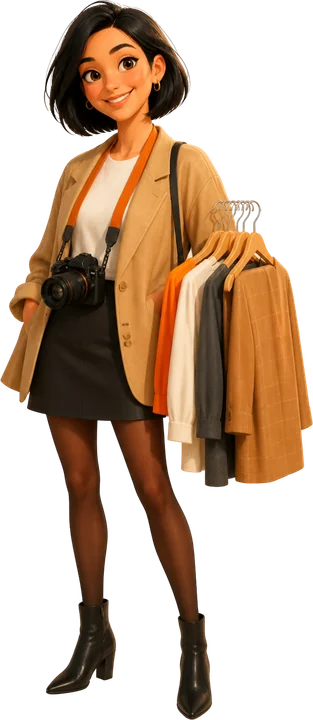
The stylist is the person at a fashion brand who decides how the product will look in photos and videos, builds outfits and gets the product ready for the shoot.
 Card: Locked · your progress is saved in this browser · save it to your account
 PIMLAND 13 · PIM
Stylist
Marketing and e-commerceStylist, in brief
Every shot is tied to the right product, the right variant and the right color.
- Prepares the shot list and builds looks that follow the style guide.
- Gets the product ready for the shoot and ensures a consistent look and the right color in every shot.
- Season rhythm: a busy launch calendar, prep day, shoot day, post-shoot matching, campaign pace.
- The most important documents are the shot list, the style guide, the look list and the image delivery list.
- Take a code card shot at the start of each product, and name the files by code while still in the studio.
- Judged by whether images are linked to the right variant and are ready by the publish date.
- Shot list
- Style guide
- Look list
- Image delivery list
 E-commerce specialist
 Merchandiser
 Sample coordinator
Read in detailall documents, workflow, cases
- Prepares the shot list: which product, in which color and size, from which angles, for which channel.
- Builds outfits that bring the product forward and follow the brand's style guide.
- Prepares the product: steams it, hides the labels, and uses pins and clips at the back to make it sit right on the body.
- During the shoot, makes sure the collar, sleeves, hem length and fabric drape are consistent in every frame; checks color accuracy with the photographer.
- Hands the e-commerce team a complete record of which frame belongs to which product and variant.
In a season
- Season launch
The shoot calendar gets tight. All the new products want to go live on the site in the same weeks.
- Prep day
Receive the products, set aside missing and defective ones, try out the looks, and label the hangers in shoot order.
- Shoot day
Light and angle are agreed with the photographer, the order with the model; the first product is approved with a test shot.
- After the shoot
The products are returned; you check that the images match the product codes.
- Campaign periods
Speed goes up, but consistency must stay the same.
Who do they work with?
 Fashion designer
- Merchandiser
- Sample coordinator
 Quality control coordinator
- E-commerce specialist
 Digital marketing and content specialist
From school to work
| What you learned at school | At work |
|---|---|
| You learn to use your creativity and develop your own style language. | At work, that creativity meets the brand's style guide. You follow trends, but you don't step outside the guide. |
| You learn the basics of color, silhouette and visual storytelling. | At work, putting together looks comes on top of that; the industry counts it among the tasks it asks for. In a study of the course content of 27 universities, look work in Illustrator appears in 2 of them (Çırpıcı 2025). |
| You learn to compose a beautiful shot and tell the product's story through a photo. | At work, a shoot counts as finished when the photo is linked to the right product and the right variant. Trying to identify an image afterward can take as long as reshooting it. |
| You learn to plan a shoot and get the product ready for the camera. | At work, a pre-revision sample or a different dye lot may arrive at the shoot. The question to ask before you put it on the hanger: is this identical to the product that will be sold? |
| You learn to adjust color and light on screen. | At work, you check the difference between the real product and the tone on screen together with the photographer. A color difference becomes a reason for customer returns. |
What do job ads ask for?
From 242 fashion and retail job ads published in Turkey in August–October 2026.
Separate job ad
In the sample of 242 job ads in Turkey, there is 1 ad with the title stylist. On the search side, interest is high: on Google Trends, 'stilist' (stylist) scores 43 and 'moda tasarımcısı' (fashion designer) 8.
Portfolio
A portfolio is mentioned in 6% of the 242 ads; most of them are designer ads. In styling, the portfolio is what really decides.
Photoshop
In 10% of the 242 ads; common in positions that do visual work.
A door into visuals and e-commerce
One of the internship ads in the sample was an e-commerce design internship. Jobs between visual production and e-commerce are one of the doors open to young people.
The first 90 days
- Study the brand's style guide and the campaign images of the last two seasons.
- Write your pre-shoot checklist: is it the latest approved product, is the color the same, is the size right, is the label hidden, is the code correct.
- Build the habit of naming files with the product and variant code before you leave the studio.
Which field of study?
Fashion design, textile and fashion design, fashion management or photography are a good background. What counts is your portfolio; most stylists start as an assistant to an experienced stylist or a shoot team.
Presenting a product the customer cannot touch in a single shot.
From the inside: documents, decisions, cases
Documents, handovers, decisions and mistakes that happen on the job.
A working day
- 08.30
You pull the current version of the shot list from the system and compare it with the printout in the studio. You flag any product added or removed overnight.
- 09.00
Product handover: you match the products coming from the sample room and the warehouse against the list. Is it the latest approved product, is the color the same, is the size right, is there a defect; you set aside the ones with problems.
- 10.00
Light and test shot with the photographer. At the start of each product, a shot is taken of a card with the product and variant code written on it and of a color reference card.
- 10.30
On-model shoot: styling, steaming, pins and clips at the back. In every shot, you check next to the camera that the collar, sleeve length and hem sit the same way.
- 13.30
Ghost mannequin and detail shots: symmetry, shoulder line, fabric texture, button and label details.
- 15.00
Flat lay and channel rules: shots taken according to the marketplaces' rules on background, ratio and framing.
- 16.30
Shot selection: the images chosen together with e-commerce are named with the product and variant code.
- 17.30
You return the products or set them aside for the next shoot; you close the return record and the image delivery list.
A sample day; hours vary by company and season.
Workflow: before you, after you
- 1Finalize the shot list and priorities.
- Input
- Season product list, publish dates
- Output
- Approved shot list and order
- Handover
- Merchandiser
- 2Request products and samples for the shoot.
- Input
- Shot list
- Output
- Product request (code, color, size)
- Handover
- Sample coordinator
- 3Check incoming products, report defects.
- Input
- Delivered products
- Output
- Defect and mismatch note
- Handover
- Quality control coordinator
- 4Confirm with design which detail of the product should stand out, and build the looks.
- Input
- Product, style guide
- Output
- Look list
- Handover
- Fashion designer
- 5Shoot, check color accuracy against the reference, select the shots.
- Input
- Looks, channel rules
- Output
- Selected images named by code
- Handover
- E-commerce specialist
- 6Return the products.
- Input
- Sign-out list
- Output
- Return record
- Handover
- Sample coordinator
Documents that pass through your hands
| Document | From | To | When | What for |
|---|---|---|---|---|
| Shot list | Merchandiser and e-commerce | Stylist and photographer | Before the shoot | Which product, in which color and size, from which angles, for which channel. If the list has changed, the printout in the studio must change too. |
| Style guide | Brand and marketing team | Stylist | At the start of the season | Poses, framing, background, the look language and what the brand does not do. Looks are built within the guide. |
| Product handover and sign-out list | Sample room and warehouse | Stylist | Prep day | Which product came to the studio under which code. After the shoot, returns are made according to this list. |
| Look list | Stylist | Photographer, merchandiser, e-commerce | Before the shoot | Which products are in each look. Whether the products in a look will be on sale is checked with the merchandiser. |
| Channel image rules | E-commerce specialist | Stylist and photographer | In the shoot plan | Each sales channel's rules on background, ratio and resolution. Since the rules can change, you check the current version. |
| Image delivery list | Stylist | E-commerce specialist | After the shoot | Which shot belongs to which product and variant, which shots were selected, which products are still missing. |
Decisions
- Look, pose and framing.Approved by: Your decision; it stays within the style guide.
- Not shooting a product that is unfit for the shoot (wrong color, old revision, defective).Approved by: The decision not to shoot is yours; removing the product from the list or postponing it needs approval from the merchandiser and e-commerce.
- Color correction in retouching.Approved by: Done with the photographer and image editing, based on the real product; final approval is with e-commerce and design.
- A new visual language that steps outside the style guide.Approved by: Not tried without approval from the brand and marketing side.
What are you evaluated on at work?
- Products on the shot list shot on the planned day
- Images linked to the right product and variant
- Need for reshoots
- Images ready by the publish date
- Fewer customer complaints about color and appearance
Common mistakes on the job
Shooting a pre-revision sample.
ResultThe image on the site shows different details from the product sold; customer complaints and returns follow.
PreventionBefore you hang it up, check that the product is the latest approved revision.
Leaving file naming until after the shoot.
ResultImages get linked to the wrong variant; you lose as much time as a reshoot.
PreventionTake a code card shot at the start of each product and name the files by code before you leave the studio.
Making the product look tighter than it is with pins and clips.
ResultThe customer misreads the fit and returns it because of the size.
PreventionFit it to the body, but don't change the character of the fit (regular, oversize); stay consistent with the fit information on the product card.
Shooting without a color reference card.
ResultThe tone on screen differs from the real product; color returns follow.
PreventionTake a shot with the reference card at every lighting setup, and have the retouching done against it.
Putting a product that won't be on sale into a look.
ResultThe customer looks for the piece in the look and can't find it.
PreventionCheck the look list with the merchandiser.
Case: what would you do?
Case 1On shoot day, a denim jacket's size is too big for the model. The product card says the fit is 'regular'. E-commerce wants it published the same day.What do you do?
A good answerYou fit it with clips at the back, but only enough for the regular fit to look right; you don't make the jacket look slim. If the right size is in the warehouse, you ask for it.
If the image shows the fit wrong, the customer buys the wrong size and returns it.
Case 2One of a dress's two colors did not arrive at the studio. The merchandiser says, 'shoot the other color, they'll change the color in retouching.'What do you do?
A good answerYou state the risk: a color created without the real product may not hold true on screen. If it has to be done, an approved lab dip or fabric swatch is used as the reference, and e-commerce and design approve; when the product arrives, it is compared with the real product. If possible, you shoot that color when the product arrives.
A color difference becomes a reason for customer returns; accuracy is not sacrificed for speed.
Case 3After the shoot, e-commerce asks which color variant two image sets belong to. The file names are the numbers the camera gave them.What do you do?
A good answerYou match them using the code card shot you took at the start of each product and the order of the shot list; you don't deliver any shot you are not sure about. From now on, you name the files by code before you leave the studio.
Matching by guesswork means images on the wrong variant; the customer receives a different color from the one they ordered.
Think of your own answer first, then open it.
How does this position work with the world?
The language of product photography is largely English: shot list, look, on-model, ghost mannequin, flat lay, styling; the image rules of international marketplaces and export customers are also published in English. At a brand that sells in many countries, the same image goes to product pages in different languages; if the image is linked to the product and variant code, it is published with the right product in every language. The product record born in PLM goes to the shot list, the image goes to DAM, and from there to the channels through PIM; the stylist's correct code matching is the first link in this chain.
What changes with PLM?
| Before | With PLM |
|---|---|
| The shot list arrives by e-mail; yesterday's printout sits in the studio. | The shot list is up to date in the cockpit; you can see there which variant is missing an image or video. |
| Images pile up in a shared folder with names like 'final-v3'. | Images are in DAM, organized in folders by season and shoot type, tagged with the product and variant code. |
| E-commerce asks, 'what color was this photo?' | The image is linked to the product card; it sits on the same card as the Turkish and English content. |
Career path
- Assistant stylist
- Stylist
- Senior stylist
- Middle manager (visual content or studio)
Glossary for this position
- Variant
- Each sellable option of the same style, distinguished by attributes such as color and size.
- SKU (stock keeping unit)
- The code that uniquely identifies each product option held in stock.
- DAM (digital asset management)
- The system that keeps product images, videos and files in one place, with folders, tags and product links.
- PIM
- Product information management: the system that gathers the information, images and multilingual content a product needs for sale in one hub and sends it to the channels.
- E-commerce cockpit
- The PIM screen that shows all variants of a product in one list, with status, season, image and channel actions.
- Multilingual content
- Keeping the names and descriptions on the same product card in more than one language, in separate fields.
- Revision
- The new version of a style, tech pack or costing after a change.
- Lab dip
- A small color trial the dyehouse prepares in the lab to hit the target color.
- SMS (salesman sample)
- The sample prepared for the showroom, catalog, sales presentations and photo shoots.
- Drop
- Releasing a collection for sale in parts on set dates, rather than all at once.
What does the work look like on screen?
The stylist's work ends in the image, but in Pimland it is linked to the product. On this tour you will see the products to be shot, the image library and where the image sits on the product card.
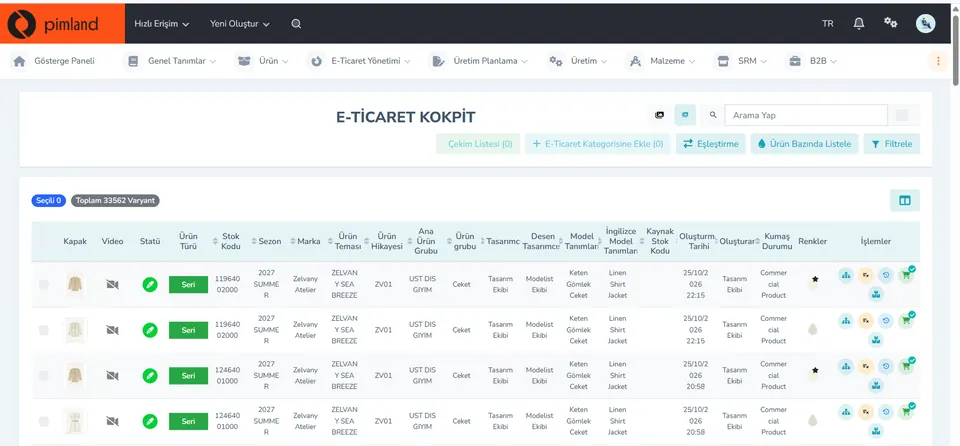
Screen from the demo environment; brands and amounts are demo data. Step 1Find the products to shoot
The top row of the cockpit shows the 'Shot List' field and the number of selected variants. The list shows each variant's cover image, video status, color and status: you see here which product is missing an image.
At work, in reality, the shot list may have changed last night. Before you start shooting, check whether the printout in the studio and the current list are the same.
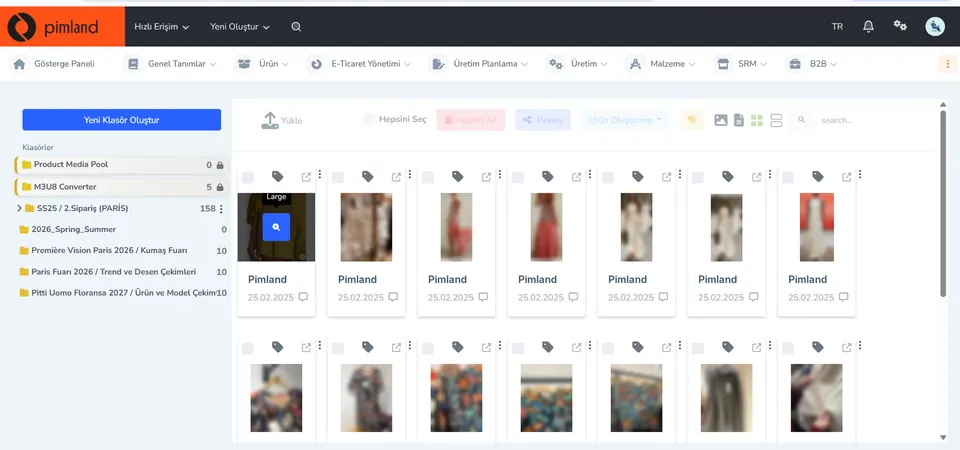
Screen from the demo environment; brands and amounts are demo data. Step 2Organize the images in folders
In digital asset management (DAM), images sit in folders: season, order, trade fair, trend and print shoots, product and model shoots. Upload, share, tag and create product actions are at the top. The photos on this screen are blurred for privacy.
At work, in reality, there are no files called 'final-final-v3'. A folder and code system lets everyone find the same image.
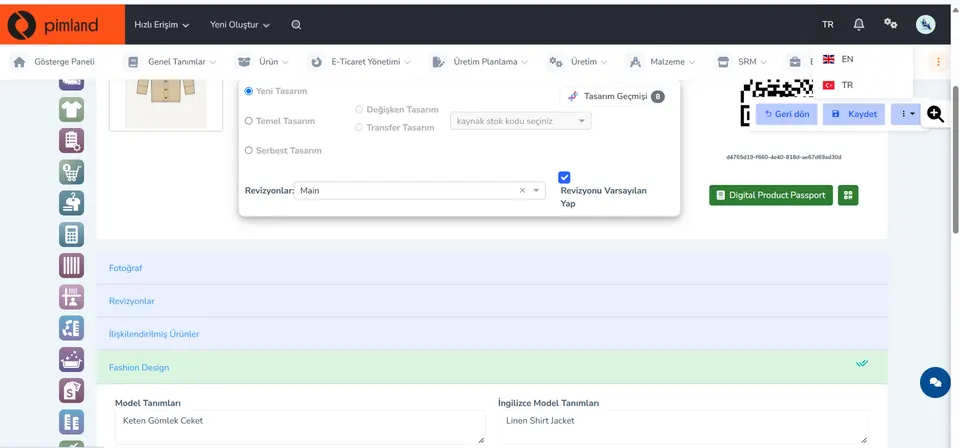
Screen from the demo environment; brands and amounts are demo data. Step 3Link the image to the product card
On the product card, photos are a separate section; the same card also holds the Turkish and English style description, revisions and linked products.
At work, in reality, as long as the image stays linked to the product card, nobody asks 'what color was this photo?'
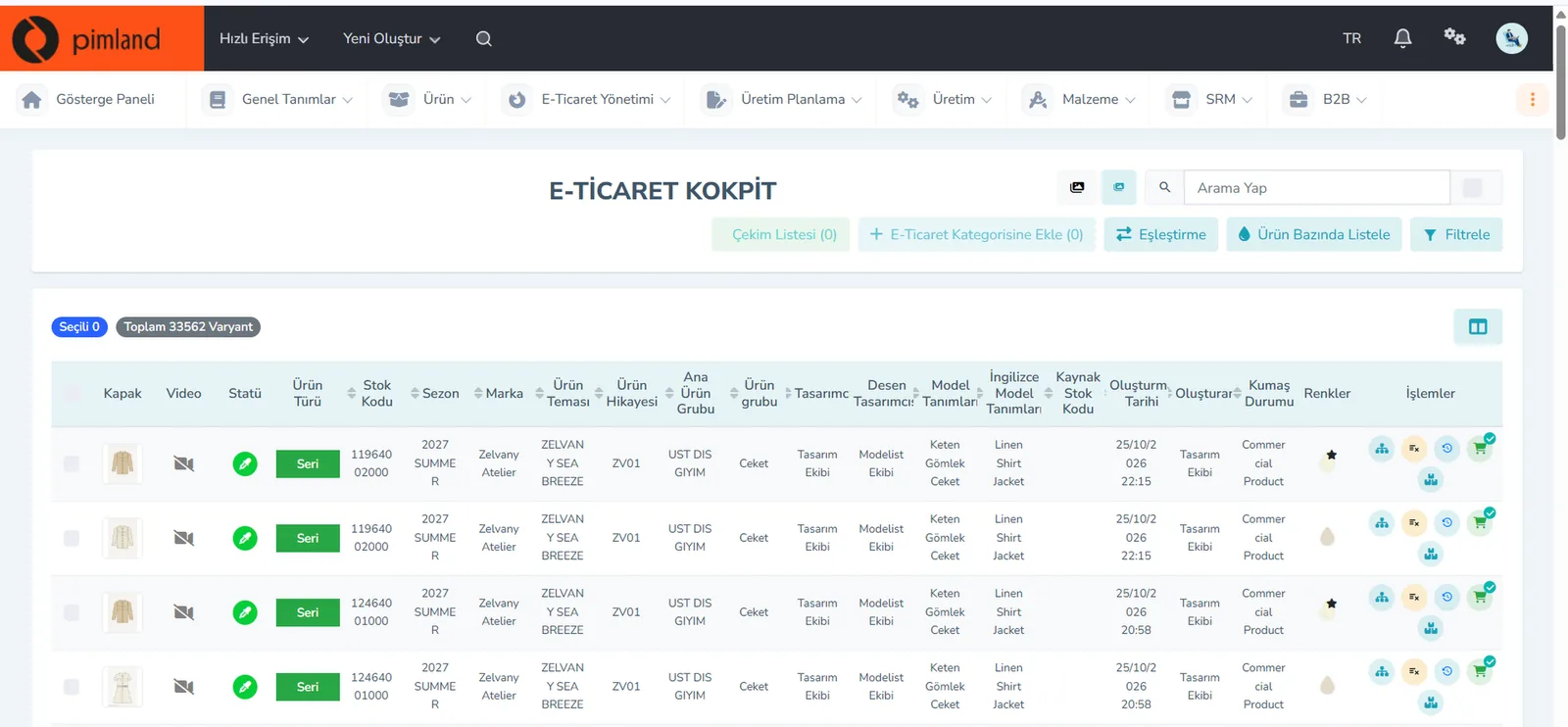


These screens are from the Pimland PIM module.
Open your card
Open your card
Read the short summary and the Pimland screens and answer at least 2 of 3 questions correctly to open the card. When all 20 cards are open, your Pimland Basic Certificate arrives in your account automatically.
How fashion, retail and manufacturing companies work, and 20 position cards
First the required reading, then the cards for 20 positions: you learn how a fashion company works.
- FirstTraining 1: How is a product born? · read to the end and complete it
- Each cardA summary of the position, audio narration and Pimland screens
- Card3 short questions at the end of each part; 2 correct answers open the next part · no time limit
- AccountWith a free account, your progress follows you on every device
- At the endOnce you complete all 20 cards, the Pimland Basic Certificate arrives in your account automatically
Certificate 1 · Pimland Basic Certificate
Reading is open to everyone; the part questions and the certificate require an Academy account.
PLM, PIM and SRM trainings
The shared language of the fashion world: PLM, PIM and SRM, with Pimland's real screens.
- OrderFirst PLM, then PIM, then SRM · one at a time
- Each training8 parts, in order · audio narration and Pimland screen
- Questions3 questions at the end of each part, 24 in total · 2 correct answers open the next part · no time limit, the questions change with every attempt
- UnlockPart questions open after your Basic certificate
- Verification14+ (date of birth in your profile); an e-Devlet education document for Turkish nationals
- At the endOnce the three trainings, ID and document are complete, Certificate 2 arrives in your account
Certificate 2 · Pimland PLM · PIM · SRM Certificate
Reading is open to everyone; the part questions and the certificate require an Academy account.
PRO · advanced training
Separate application, for selected candidates.
- WhoCandidates selected from applicants who hold both certificates
- OnlinePimland PLM software training and test
- On site1 day inside a fashion company, seeing PLM in use
- ApplicationWith “Apply for PRO training” on the PRO page; places are limited, and selected candidates hear back by email
Certificate 3 · Pimland PRO Certificate
Reading is open to everyone; the part questions and the certificate require an Academy account.
FAQFrequently asked questions about stylists
4 questions
The fashion designer designs the product. The stylist at a product shoot tells the story of an existing product through outfits, preparation and framing. In Turkey, apparel companies can also call the designer a 'stilist', so the two words get mixed up.
The pattern maker prepares the pattern and makes sure the garment fits the body. The stylist sets up how the product will look in photos and videos. One works inside the product, the other in its shop window.
Fashion design, textile and fashion design, fashion management or photography are a good background. What counts is your portfolio; the list of Turkey's Vocational Qualifications Authority (MYK) has no separate standard for styling.
A type of shoot in which the product appears without a model, like a hollow form. Here the stylist looks at symmetry, the collar and shoulder line, and making the inside look clean.
· Pimland Academy team