What does a middle manager do?
DepartmentManagementModulePLM
The middle manager is the person at a fashion brand or a fashion manufacturer who manages a team or a department such as design, product, purchasing, production, e-commerce or stores, plans the work according to the season calendar and coordinates between teams.
 Card: Locked · your progress is saved in this browser · save it to your account
 PIMLAND 20 · PLM
Middle manager
ManagementMiddle manager, in brief
A manager who sees the whole picture, puts priorities in writing and closes every meeting with a decision finishes the season on time.
- Plans the team's workload against the season calendar and sets priorities.
- Builds bridges between departments, makes decisions with data and develops the team.
- Season rhythm: calendar and capacity, responsibilities, weekly coordination, deviation management, end-of-season review.
- The most important documents are the season calendar, the workload plan, the meeting decision note and the weekly status report.
- Take a deviation up the line the week you notice it, with its impact and options.
- Judged by meeting milestones, cost and margin, team development and collaboration.
- Season calendar and milestones
- Team workload and responsibility plan
- Meeting decision note
- Weekly status report
 Collection manager
 Merchandiser
 Production follow-up coordinator
Read in detailall documents, workflow, cases
- Plans the team's workload according to the season calendar: who does which task, by what date, and in which week the load will pile up.
- Sets priorities. When everything looks urgent, moves forward the task that would push back the launch.
- Builds bridges between departments: design's decision reaches purchasing, purchasing's delivery date reaches production, and production's status reaches the sales channel on time.
- Makes decisions with data: sell-through, delivery date variance, how far the cost is from target.
- Clarifies the approval flow and responsibilities, reports upward regularly, gives the team feedback and helps it grow.
In a season
- Start of season
Calendar and capacity. You work backward from the launch date; you see in advance which weeks the team's load goes up.
- Plan
Goals and responsibilities. Who approves what, who follows up on what; a written list everyone knows.
- Development and ordering
Weekly coordination meetings. Pending decisions between design, purchasing and production come to the table.
- Production
Deviation management. A late delivery date or a cost above target is spotted early and taken up the line together with an option.
- Launch and sales
You check whether the product is on the shelf and on screen on time. The first sales data is read, and priorities change if needed.
- End of season
Review. What worked, where it got stuck; a feedback conversation with everyone on the team. The notes go into the next season's plan.
Who do they work with?
- Collection manager
- Merchandiser
 Fashion designer
 Sourcing / purchasing specialist
 Costing specialist
- Production follow-up coordinator
 E-commerce specialist
 Store sales associate
 Planning specialist
From school to work
| What you learned at school | At work |
|---|---|
| In a group project, you learn to divide up the work and get the team to a deadline. | In working life, you use the same skill to manage a season team: who does which job, which week the load goes up, which date must not be missed. The calendar is built backward from the launch date. |
| You learn to be responsible for the quality and the deadline of your own work. | In working life, responsibility is spread across the team. If who approves what isn't written down, decisions hang in the air; making the approval flow clear is your job. |
| You learn to combine what you learned in different courses into a single project. | In working life, you do this with departments: design's decision has to reach purchasing, purchasing's delivery date has to reach production, and production's status has to reach the sales channel on time. |
| You learn to get feedback from your teachers and classmates. | In working life, it is your turn to give feedback. A short, concrete note given at the right time helps the team set up the next season better. |
| You learn to present a project to your class or a jury. | In working life, you report up the line. A good report doesn't describe every job; it states the deviation, its cause and the solution you propose. |
What do job ads ask for?
From 242 fashion and retail job ads published in Turkey in August–October 2026.
Sales data and commercial sense
It appears in 58% of the 242 job ads in Turkey we reviewed. A manager backs decisions with sales and stock data.
Season calendar and delivery dates
In 29% of the 242 ads. Keeping the team on the calendar is the manager's responsibility.
Supplier and contract manufacturing coordination
In 25% of the 242 ads. Keeping information flowing between teams and companies is at the center of this position.
Costing
In 19% of the 242 ads. Spotting a cost above target early is expected from this position.
Experience
Of the senior and manager-titled ads we reviewed that state years of experience, 67% ask for at least 5 years. People usually reach this position after working a few seasons in a specialist area.
The first 90 days
- Meet one-on-one with everyone on your team: what they are doing, where they get stuck, what they need.
- Put the approval flow on paper: which decision sits with whom, which document is waiting for whose approval. If there is a gap, close it first.
- Find three jobs in the calendar that are turning into delays; give each an owner and a date, and check them the following week.
Which field of study?
There is no single required department. Business administration, textile engineering, industrial engineering, fashion design, and textile and fashion design are common starting points. Let's be honest: you don't go straight into this position; you usually get here after working a few seasons in a specialist area. The skills you can prepare from today, though, are clear: building a calendar, reading data in Excel, taking meeting notes and following up on decisions, writing clearly, giving and receiving feedback.
Seeing the whole picture while everyone looks at their own work, and getting the right people to the same table at the right time.
From the inside: documents, decisions, cases
Documents, handovers, decisions and mistakes that happen on the job.
Management basics, in fashion
Prioritization
When everything looks urgent, you first do the job that would push back the launch date. In fashion, this is usually the job on the critical path: a fit sample waiting for approval, a fabric order not yet placed, a cost not yet approved.
Resources and workload
In the season calendar, loads pile up: the costing process, showroom week, sample rounds, launch. You arrange people and work before that week; overtime is not a plan.
Handovers between departments
At every handover, from design to product development, from purchasing to production, from production to the sales channel, what goes, in which version and to whom is written down. If the handover has no clear owner, the work falls through the cracks.
Deviation management
A late delivery date, a cost above target, a quality finding. You spot the deviation early, work out its impact and take it to the decision-maker together with options.
Team development
One-on-one meetings, short and timely feedback, a buddy for new starters in their first weeks. Keeping knowledge in the record rather than in people stops the team from starting from zero every season.
Reporting
A good report doesn't describe every job: what is done, what is late, why, what you propose, which decision you are waiting for. You give numbers with their source.
A working day
- 08.45
You look at the calendar and the open jobs: which milestone is this week, which one is at risk. You single out the jobs on the critical path; if they slip, the launch slips too.
- 09.30
A short stand-up meeting with the team: what got done yesterday, what is happening today, who is stuck where. You don't try to solve the stuck job in the meeting; you talk to the person involved afterward.
- 10.30
Coordination between departments: design, product development, purchasing, production. Samples waiting for approval, orders not yet placed, delivery date risks. Every decision gets an owner and a date written next to it.
- 12.00
The cost summary shows styles above target. You prepare options with the costing specialist and the merchandiser: a fabric alternative, quantity, price, or dropping the style.
- 14.00
A one-on-one with a new team member: what they learned in their first weeks, what they didn't understand, who they get support from.
- 15.00
A fabric supplier has pushed back its delivery date. You work out the impact: which styles, which drop, which channel. You write down the options; you take the bad news up without waiting.
- 16.30
Weekly report: what is done, what is late, why, what you propose, which decision you are waiting for. You don't describe every job; you describe the deviation.
- 17.30
You write down tomorrow's priorities. If you said yes to a new job today, you also write down which job will wait, and tell the team.
A sample day; hours vary by company and season.
Workflow: before you, after you
- 1Plan the season capacity
- Input
- Season calendar, line plan, the team's current work
- Output
- Weekly workload plan and responsibility list
- Handover
- Collection manager
- 2Make the approval flow clear
- Input
- Handovers between design, product development and purchasing
- Output
- List of who approves which document at which stage
- Handover
 Product development specialist
- 3Run the weekly coordination
- Input
- Open jobs, samples waiting for approval, order status
- Output
- Decision note with owner and date in writing
- Handover
- Sourcing / purchasing specialist
- 4Manage the deviation with options
- Input
- Delivery date slip, cost above target, quality finding
- Output
- Impact analysis and a decision with options; a plan for carrying out the decision
- Handover
- Production follow-up coordinator
- 5Check launch readiness
- Input
- E-commerce cockpit, shipment status, store allocation
- Output
- List of gaps in the variants going on sale, with their owners
- Handover
- E-commerce specialist
- 6Read the first sales, update priorities
- Input
- Sell-through, stock, return reasons
- Output
- Proposal for a reorder, channel shift or markdown
- Handover
- Merchandiser
- 7Review the season, develop the team
- Input
- Season data, feedback from the team and other departments
- Output
- End-of-season review and individual development notes
- Handover
- Collection manager
Documents that pass through your hands
| Document | From | To | When | What for |
|---|---|---|---|---|
| Season calendar and milestones | Collection and planning | The manager, then the team | Start of the season, and with every change | Seeing in advance which weeks the team will be loaded. |
| Team workload and responsibility plan | Manager | Team and senior management | Start of the season, updated weekly | Who is doing what, by which date; where the weeks clash. |
| Meeting decision note | Manager | Departments involved | After every coordination meeting | So the decision, its owner and its date stay in writing. |
| Cost summary and deviation note | Costing specialist | The manager, then senior management | Before the line review and whenever the cost changes | Seeing the item above target before the meeting. |
| Order and delivery date status | Purchasing and production follow-up | Manager | Weekly | Finding the order whose due date is close but is still open. |
| Weekly status report | Manager | Senior management | Weekly | Explaining the deviation, its cause and the proposed solution briefly, with sources. |
| End-of-season review | The manager and the team | The next season's plan | End of season | What worked, where it got stuck; so the lesson goes into the next brief. |
Decisions
- Priorities and work allocation within the teamApproved by: You; if it affects the launch date, you inform senior management.
- Options for a cost above target (fabric, quantity, price, dropping the style)Approved by: You propose; the collection manager and senior management approve.
- Moving a late style to the next dropApproved by: You propose it together with the merchandiser and the collection team; senior management approves.
- Moving the launch dateApproved by: Senior management; you propose with data and options.
What are you evaluated on at work?
- Meeting milestones and the launch date
- Delivery date deviation and meeting target cost
- Sell-through and margin
- Team engagement, development and retention
- Collaboration feedback from other departments
Common mistakes on the job
Treating every job as urgent.
ResultThe team piles onto the visible work; the job on the critical path is delayed.
PreventionMake the critical path visible in the calendar; give priorities in writing.
Taking bad news up the line late.
ResultBy the time a decision is due, there are no options left.
PreventionTake the deviation up the week you notice it, with its impact and options.
Making a decision in a meeting without writing down its owner and date.
ResultEveryone thinks someone else is doing the job; the topic comes back at the next meeting.
PreventionEvery meeting ends with a decision note: what, who, when.
Doing the work yourself instead of delegating it.
ResultYou become the bottleneck; the team doesn't grow.
PreventionDelegate, state the expectation and the date clearly, and set a midpoint check-in.
Saving feedback for the end of the season.
ResultThe same mistake repeats all season.
PreventionSay it briefly and concretely, right after it happens.
Case: what would you do?
Case 1Showroom order week and the costing process fall in the same week. The same people on your team are needed for both.What do you do?
A good answerYou see the clash in the calendar weeks ahead. You bring part of the costing work forward and write down who will be where that week. If you can't solve it, you ask senior management to set the priority, with options.
A capacity problem isn't solved when that week arrives; it is solved earlier, in the calendar.
Case 2A fabric supplier has pushed back its delivery date. This fabric is used in several of the launch products.What do you do?
A good answerYou work out the impact: which style, which drop, which channel. You prepare options with purchasing and the merchandiser: an alternative fabric (needs a new sample and approval), splitting the launch, or moving the style to the next drop. You go to senior management with a one-page proposal.
A manager carries a decision up, not a problem. Bad news without options keeps everyone waiting.
Case 3An experienced specialist on your team keeps delivering work late; the others are waiting for them.What do you do?
A good answerYou meet one-on-one and ask why: is it workload, an unclear brief, skills or a personal situation? You set a concrete expectation and date; if the problem is workload, you change the allocation, and if it is unclear roles, you make the approval flow clear.
You manage the cause, not the behavior. If the cause isn't solved, the delay passes to someone else.
Think of your own answer first, then open it.
How does this position work with the world?
A middle manager is often the meeting point of the global chain: managing the same calendar with the customer brand abroad, foreign suppliers and teams in different time zones. Terms like critical path, milestone and lead time are the language of the meeting. When the calendar, approvals and change history sit in a shared record in PLM, the 'which file is current' debate with remote teams ends; data requirements such as the EU digital product passport are also passed to teams through the same record.
What changes with PLM?
| Before | With PLM |
|---|---|
| To find out the status, you ask everyone one by one; the weekly report takes you hours. | The calendar, jobs waiting for approval and open orders are on the same screen; meetings are for making decisions, not gathering status. |
| Who made a decision and when gets lost in e-mails. | The approval flow and change history are on record; the discussion moves to solutions, not looking for someone to blame. |
| You find out about a deviation when the shipment is late. | A delay on the critical path and a cost above target show up early; you have time to come up with options. |
Career path
- Specialist in one area (design, product development, purchasing, production, e-commerce or retail)
- Senior specialist or team lead
- Middle manager (team or department manager)
- Senior manager
Glossary for this position
- Critical path
- A chain of linked tasks where any delay directly pushes back the launch.
- Delivery date
- The date by which a task, material or order must be delivered.
- Approval flow (status flow)
- The sequence of stages a product goes through from design to bulk, and the approval at each stage.
- Line review (collection approval)
- The meeting where styles are evaluated together with their samples, costing and sales expectations, and the decision to continue, revise or drop is made.
- Sell-through (sales rate)
- The ratio of units sold in a period to units offered for sale in the same period.
- Markdown (discount)
- Lowering the price of a product whose sales fall below expectations.
- Target cost
- The upper limit a product's cost must not exceed, calculated backward from the target selling price and target margin.
- Target margin
- The target a brand aims for, expressed as the difference between selling price and cost divided by the selling price.
- Drop
- Releasing a collection for sale in parts on set dates, rather than all at once.
- Revision
- The new version of a style, tech pack or costing after a change.
- PLM
- Product lifecycle management: the system that keeps a product's development information, from its calendar, design, tech pack and bill of materials to its samples and costing, in a single record.
- SRM
- Supplier relationship management: the system that runs supplier cards, orders, production follow-up and quality inspections in a shared record between brand and supplier.
What does the work look like on screen?
A middle manager's screen is not the detail of a single job but the sum of the teams. In this tour, you will look at the season calendar, supplier orders, the cost summary, a product's change history and the e-commerce cockpit through a manager's eyes.
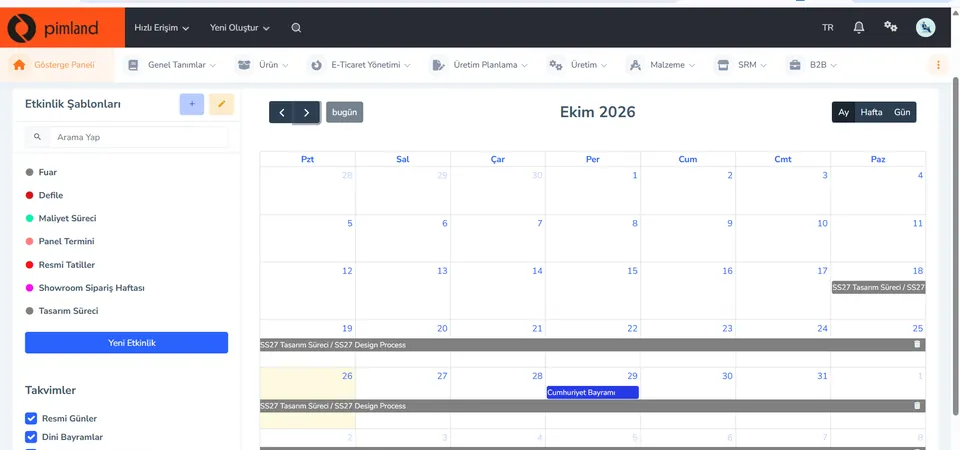
Screen from the demo environment; brands and amounts are demo data. Step 1Read the team's calendar
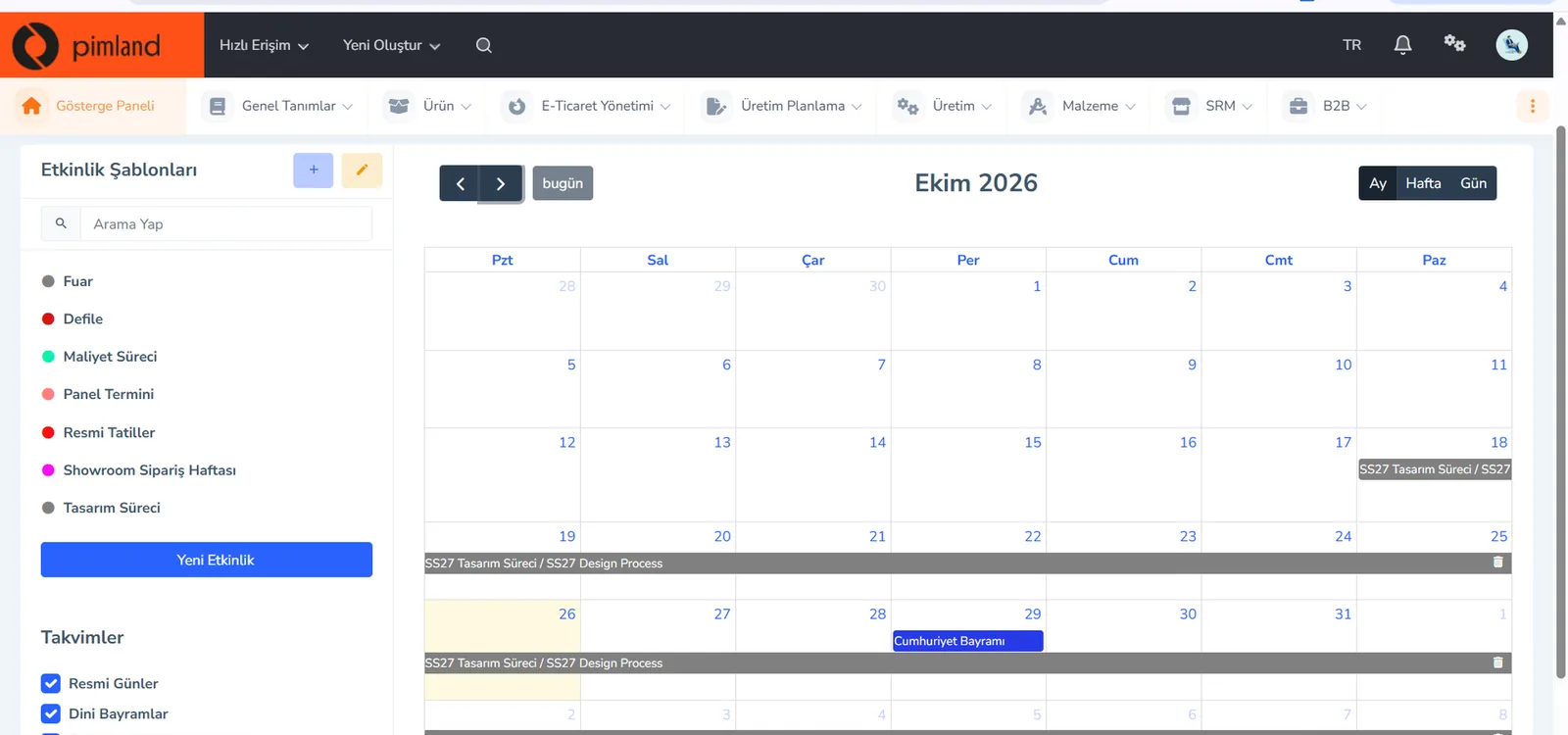
Event templates are on the left: trade fair, fashion show, costing process, panel deadline, showroom order week, design process. You open the calendar in month, week or day view; public holidays are in the same calendar.
In real working life, a manager looks at the calendar to see which weeks the team's load piles up. If the costing process and showroom week clash, you arrange people and priorities before that week.
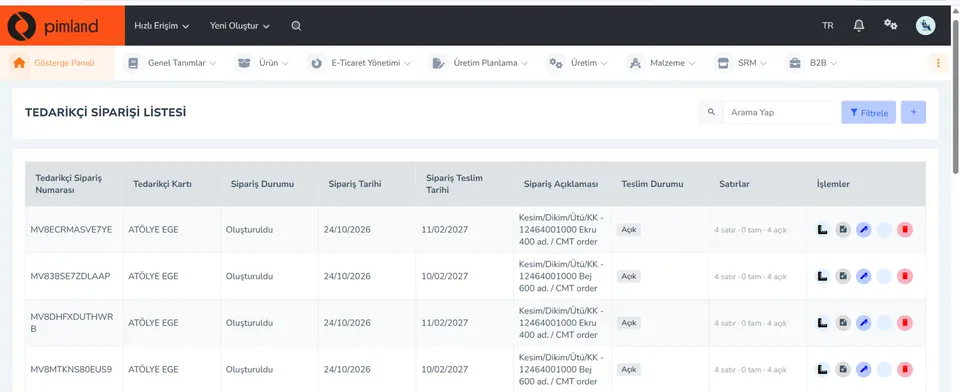
Screen from the demo environment; brands and amounts are demo data. Step 2See what's still open in orders
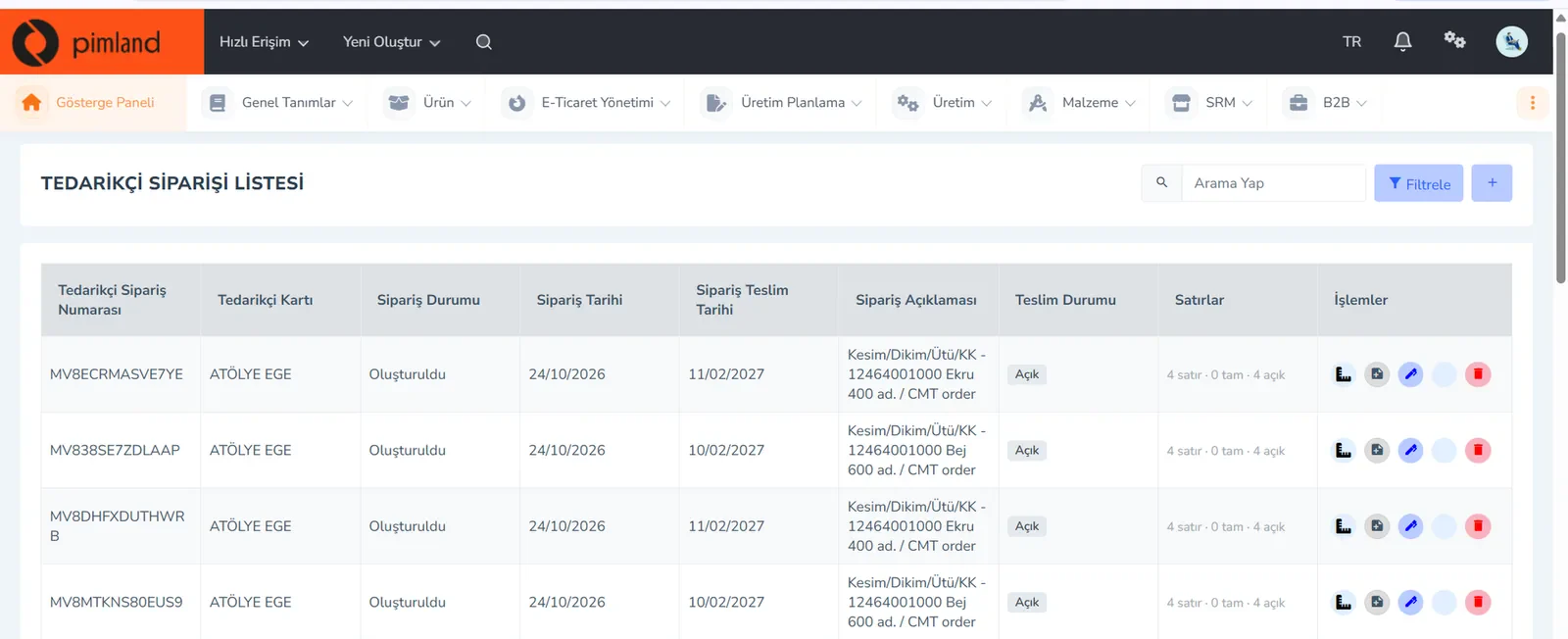
The supplier order list shows the order number, supplier card, order status, order and delivery dates, delivery status and lines. The lines column shows how many lines are complete and how many are open.
In real working life, a manager doesn't follow every order one by one. They find the order whose due date is close but whose lines are still open, and ask: who owns this, and when will it close?
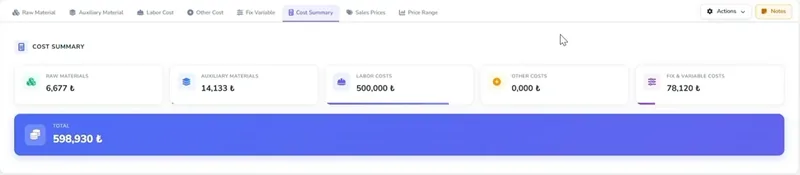
Screen from the demo environment; brands and amounts are demo data. Step 3Catch a cost deviation early
The cost summary breaks a product's cost down into its components: raw materials, trims, labor, other costs, fixed and variable expenses; the total is at the bottom. This view is from the English interface.
In real working life, you see the item above target with your team before the meeting. If the problem comes to the table with an option, the decision takes minutes.
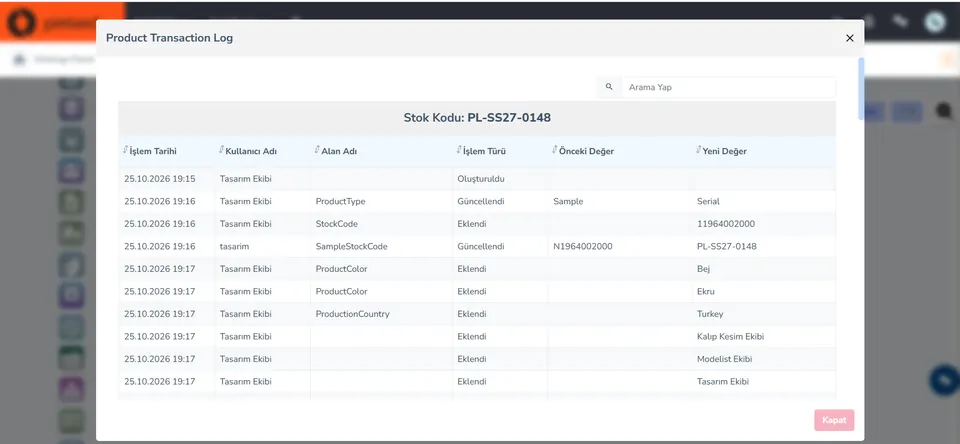
Screen from the demo environment; brands and amounts are demo data. Step 4Who changed what, and when
The product activity log keeps every change line by line: date, user, field name, action type (created, updated, added), old and new value.
In real working life, most arguments between teams start with the question 'who changed this?' If the log is out in the open, the conversation moves to a solution, not to finding someone to blame.
Screen from the demo environment; brands and amounts are demo data. Step 5See the channel launch as a whole
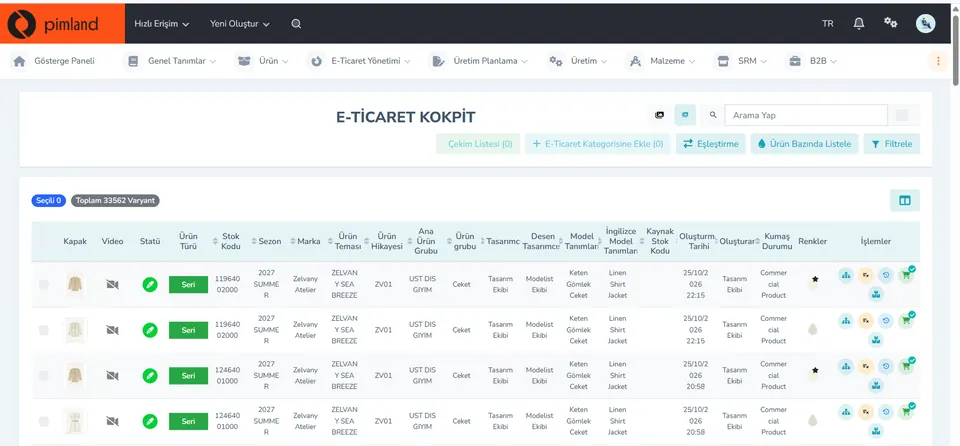
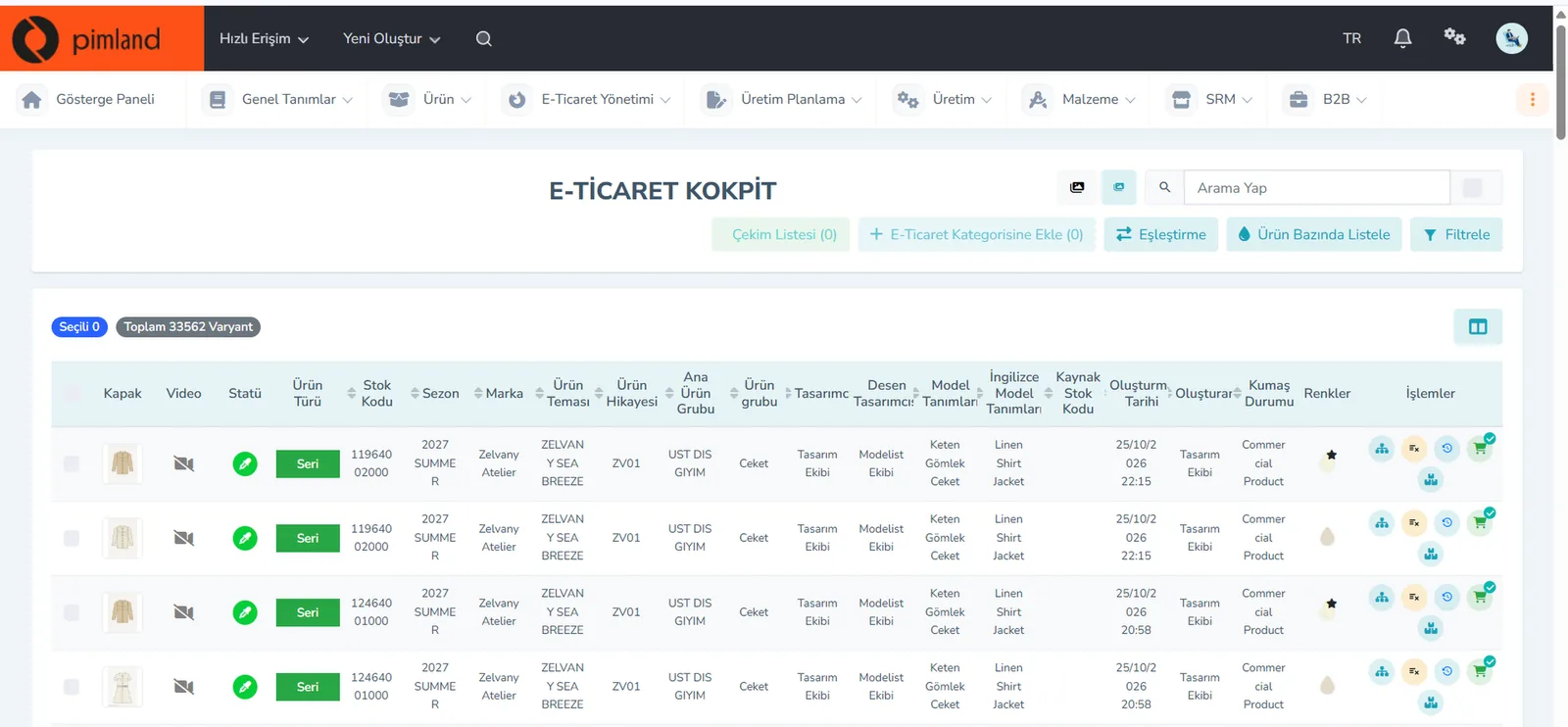
The e-commerce cockpit lists products by variant: cover image, status, product type, stock code, season, brand, product group, colors. At the top are the total number of variants and filter options.
In real working life, before a launch the manager has just one question: are all the variants going on sale ready? A list filtered by missing field tells you what is expected from which team.


These screens are from the Pimland PLM module.
Open your card
Open your card
Read the short summary and the Pimland screens and answer at least 2 of 3 questions correctly to open the card. When all 20 cards are open, your Pimland Basic Certificate arrives in your account automatically.
How fashion, retail and manufacturing companies work, and 20 position cards
First the required reading, then the cards for 20 positions: you learn how a fashion company works.
- FirstTraining 1: How is a product born? · read to the end and complete it
- Each cardA summary of the position, audio narration and Pimland screens
- Card3 short questions at the end of each part; 2 correct answers open the next part · no time limit
- AccountWith a free account, your progress follows you on every device
- At the endOnce you complete all 20 cards, the Pimland Basic Certificate arrives in your account automatically
Certificate 1 · Pimland Basic Certificate
Reading is open to everyone; the part questions and the certificate require an Academy account.
PLM, PIM and SRM trainings
The shared language of the fashion world: PLM, PIM and SRM, with Pimland's real screens.
- OrderFirst PLM, then PIM, then SRM · one at a time
- Each training8 parts, in order · audio narration and Pimland screen
- Questions3 questions at the end of each part, 24 in total · 2 correct answers open the next part · no time limit, the questions change with every attempt
- UnlockPart questions open after your Basic certificate
- Verification14+ (date of birth in your profile); an e-Devlet education document for Turkish nationals
- At the endOnce the three trainings, ID and document are complete, Certificate 2 arrives in your account
Certificate 2 · Pimland PLM · PIM · SRM Certificate
Reading is open to everyone; the part questions and the certificate require an Academy account.
PRO · advanced training
Separate application, for selected candidates.
- WhoCandidates selected from applicants who hold both certificates
- OnlinePimland PLM software training and test
- On site1 day inside a fashion company, seeing PLM in use
- ApplicationWith “Apply for PRO training” on the PRO page; places are limited, and selected candidates hear back by email
Certificate 3 · Pimland PRO Certificate
Reading is open to everyone; the part questions and the certificate require an Academy account.
FAQFrequently asked questions about middle managers
4 questions
First, expertise in one area: design, merchandising, purchasing, production or e-commerce. Then planning that work with a team, setting priorities, making decisions with data and giving feedback. Among the senior and manager-titled job ads in the sample that state a number of years, 67% ask for at least 5 years; in other words, this is a target position you reach through experience.
The collection manager builds and tracks the collection's season calendar; it is a specialist position. The middle manager, on the other hand, heads a team or a department: design, purchasing, production, e-commerce or stores. The other positions at the Academy are at coordinator and specialist level; only this page covers management.
No. Pimland Academy is about fashion and retail; the examples, calendars and screens here come from the teams of fashion brands and fashion manufacturers. Some principles of management carry over to other industries, but we cover fashion and retail teams.
In group projects, be the person who builds the calendar and writes down the decisions. Practice reading data in Excel, writing short and clear reports, and giving and receiving feedback without taking it personally. These will make you stand out in your first job too.
· Pimland Academy team