How do you become an e-commerce specialist?
DepartmentMarketing and e-commerceModulePIM
The e-commerce specialist is the person who prepares a fashion brand's products for sale on its own online store and on marketplaces, publishes them and tracks their performance.
 Card: Locked · your progress is saved in this browser · save it to your account
 PIMLAND 15 · PIM
E-commerce specialist
Marketing and e-commerceE-commerce specialist, in short
Every piece of information on the screen comes from the up-to-date product record; the return reason goes back to the product card.
- Prepares the product card and opens the product on the website and marketplaces.
- Monitors price and stock consistency, sets up campaigns, reads conversion and return reasons.
- Season rhythm: new product cards, a report every morning, campaigns, the sale period, lessons from return reasons.
- The most important documents are the product information set, the online size chart, approved images and the price-campaign list.
- Pull information from the up-to-date product record; take the color name from a single list.
- Judged on conversion, return rate, and products going live on time and complete.
- Product information set
- Online size chart
- Shoot list and approved images
- Price and promotion list
 Stylist
 Product development specialist
 Merchandiser
Read in detailall documents, workflow, cases
- Prepares the product card: title, description, fabric and care information, measurement chart, images, color and size variants.
- Puts the product live on the brand's own site and on marketplaces; fixes products that are not approved or that return errors.
- Monitors that prices and stock information in the channels are consistent with the warehouse and the ERP.
- Sets up discounts, coupons and special-day campaigns.
- Reads views, add-to-cart, conversion and return reasons; improves weak pages.
In a season
- Season launch
New product cards with images from the shoot and information from product development.
- Every morning
Yesterday's sales, stock and return report; products with falling sales or sold-out stock are set aside.
- Campaigns
Campaign setup, price checks, matching with the marketing calendar.
- Sale period
Price changes and stock; watch out for products that show as partly unavailable.
- End of season
Return reasons go back to the product card as lessons: size chart, fit note, color information.
Who do they work with?
- Stylist
- Product development specialist
- Merchandiser
 Sustainability specialist
 Customer service representative
 Store sales associate
 E-commerce operations specialist
 Digital marketing and content specialist
From school to work
| What you learned at school | At work |
|---|---|
| You learn to present a product with visuals and build a strong presentation. | At work, the product card comes alongside the image. The customer can't touch the product; they read the fabric, fit and care from the card. The technical part of the card comes from product development. |
| You learn the basics of presenting a product online. | At work, the brand's own website and the marketplaces run on different rules: each channel has its own category structure, required fields and image rules. Entering the same product into every channel separately is the most tiring part of the job. |
| You get to know the basic concepts of sales and marketing. | At work, you read sales step by step: views, add-to-cart, conversion, returns and stock together. Only this way can you see at which step you lose the customer. |
| You start to understand customer behavior and satisfaction. | At work, a return is a clue. A product sent back with 'size too small' tells you that the size chart or the fit note needs fixing. |
| You get to know Excel and build your first spreadsheets. | At work, Excel becomes your main tool; one e-commerce ad lists it as a 'must'. The things you measure are conversion rate, average basket, return on ad spend and margin. |
What do job ads ask for?
From 242 fashion and retail job ads published in Turkey in August–October 2026.
Excel
In 38% of the 242 ads; clearly required in e-commerce ads.
Sales data and analytics
In 58% of the 242 ads. E-commerce ads name indicators such as conversion rate, average basket, return on ad spend and margin.
Experience
The sample has 26 e-commerce and marketplace ads; 14 have entry-level titles. On the e-commerce warehouse and shipping side, 10 of the 12 ads also have entry-level titles.
The internship route
An e-commerce design intern ad was one of the internship routes in the sample.
The first 90 days
- Study a product card field by field; find the source of each piece of information: tech pack, BOM, shoot, ERP.
- Check the sales, stock and return report every morning; set aside the falling product and the sold-out size.
- Collect the most frequent product questions from customer service; add the answer to the card.
Which field of study?
Business administration, marketing, e-commerce and digital marketing are common. In fashion e-commerce, knowing the product matters as much as digital skills: fabric, fit, size. The E-Commerce Category Manager (Level 6) standard of Turkey's Vocational Qualifications Authority (MYK) defines the senior position in this field.
Turning the product in the warehouse into a product that sells on screen.
From the inside: documents, decisions, cases
Documents, handovers, decisions and mistakes that happen on the job.
A working day
- 09.00
You open the channel error list: products rejected by the marketplace, required fields left empty, variants whose categories don't match. You don't start fixing before writing down the cause of the error; otherwise the same error shows up tomorrow on another product.
- 09.45
In the sales and stock report, you flag products that get many views but few add-to-carts, and products whose sizes are about to sell out. A short note goes to the merchandiser: which product, which size, what you suggest.
- 10.30
New images from the shoot land in the digital asset archive (DAM). You check the cover image, the color order and each channel's image rules; you set aside any image linked to the wrong color.
- 11.30
New product cards: attributes, composition, care, online size chart. If a technical field is empty, you ask product development; you don't copy from a similar product.
- 13.30
For the weekend campaign, you check the marketing calendar: which products are in, when the discounted price opens and closes, which product stays out of the campaign. When you finish the setup, a second pair of eyes checks it.
- 14.30
Customer service's weekly question report arrives. If the question 'Does it run small?' keeps coming for the same product, you get the fit note from product development and add it to the card.
- 16.00
For products going to an international channel, you compare the English style description and care information with the Turkish. Different information in two languages means two different products.
- 17.30
Final round for tomorrow's drop: price, stock, image, variant. You pull what isn't ready from publishing and leave the list with the relevant team; an incomplete card doesn't go live.
A sample day; hours vary by company and season.
Workflow: before you, after you
- 1Derive shoot needs from the season's product list
- Input
- Line plan and launch calendar
- Output
- Draft shoot list in priority order (product, color, channel)
- Handover
- Stylist
- 2Pull technical information from its source, list what's missing
- Input
- Tech pack, BOM, online size chart
- Output
- Product record with composition, care and measurement fields filled; list of missing fields
- Handover
- Product development specialist
- 3Have the environmental claims in the product copy verified
- Input
- Draft product description
- Output
- Claims matched to a document, or removed
- Handover
- Sustainability specialist
- 4Set up the price and campaign, hand it over for checking
- Input
- Price and promotion list
- Output
- Prices set up and checked in the channels
- Handover
- Merchandiser
- 5Take it live, inform customer service
- Input
- Approved content, images, price and stock
- Output
- Live products channel by channel; a short briefing note for new products
- Handover
- Customer service representative
- 6Read return reasons and recurring questions
- Input
- Return report, customer service question report, customer reviews
- Output
- Card correction; feedback on fit or measurements
- Handover
- Product development specialist
- 7Write the end-of-season channel review
- Input
- The season's sales, return and channel error data
- Output
- What worked, where we lost; recommendations for next season
- Handover
 Middle manager
Documents that pass through your hands
| Document | From | To | When | What for |
|---|---|---|---|---|
| Product information set (composition, care, fit note) | Product development | E-commerce | Before the product card is opened | Filling the card's technical fields from a single source, so the label and the website say the same thing. |
| Online size chart | Product development and pattern maker | E-commerce | Before going live | Size information the customer can compare with their own measurements; the first barrier against size-related returns. |
| Shoot list and approved images | Stylist (through DAM) | E-commerce | After the shoot | Every variant going live with an image in the right color and angle. |
| Price and promotion list | Merchandiser and marketing | E-commerce | At season opening and before every campaign | The right price opening and closing at the right time in the channels. |
| List of approved environmental claims | Sustainability specialist | E-commerce | While writing product copy | Using on the product page only claims that are backed by a document, exactly as the document states them. |
| Channel error report | Marketplace and website panels | E-commerce, and product development if needed | Every day | Finding the reason a product can't go live and fixing it at the source. |
| Sales, stock and return report | E-commerce | Merchandiser and manager | Summary every morning, details weekly | Spotting early the product with falling sales, sold-out stock or heavy returns. |
Decisions
- Taking a product with missing information live, or holding itApproved by: You decide; if it's a launch product, you consult your manager.
- Shortening the title for a channel, mapping categories and attributesApproved by: You; within the brand's content rules.
- Campaign price and discount rateApproved by: The merchandiser and their manager; you do the setup and the check.
- Using an environmental claim on the product pageApproved by: The sustainability specialist; a claim without a document doesn't go live.
What are you evaluated on at work?
- Conversion and add-to-cart rate
- Return rate and the breakdown of return reasons
- Products going live on time and complete
- Channel errors and rejections
- Price and stock consistency across channels
Common mistakes on the job
Copying technical information from an old tech pack or a similar product.
ResultComposition or care is written wrong; the label, the website and the passport don't match, and complaints and returns follow.
PreventionAlways pull information from the up-to-date product record; flag any field you copied until it has been checked.
Entering the same color under different names in different channels (navy, navy blue, dark blue).
ResultThe product gets split in the color filter; the customer can't find what they're looking for.
PreventionThe color name comes from a single list; only its translation changes by channel.
Opening the campaign price at the wrong time, or not reverting it when the campaign ends.
ResultLost margin, or the complaint 'a different price showed up in the cart'.
PreventionA campaign checklist and a second-person check after setup.
Featuring a product that's down to a single size in the showcase and in ads.
ResultTraffic comes, sales don't; the customer can't find their size.
PreventionCheck size depth before featuring a product; sort listings by stock status.
Using a generic size chart instead of the product's own measurements.
ResultSize-related returns on slim-fit or loose-fit products.
PreventionUse the product's online measurement set; get the fit note from product development.
Case: what would you do?
Case 1In the collection going live tomorrow morning, a jacket's composition says one thing in the tech pack and another in the BOM; the fabric seems to have changed.What do you do?
A good answerYou open the other products as planned and hold the jacket. You ask product development which record is current, and when the answer comes, you correct the card and open it.
A wrong composition turns into a wrong label, a wrong passport and returns; it is also a risk when selling to the EU. One product going live late is a smaller loss.
Case 2A dress gets many views but few add-to-carts; the returns say 'size too small'.What do you do?
A good answerYou compare the size chart on the card with the product's online measurement set and look at customer reviews. You ask product development for a fit note and add it to the card; you also send the finding back to product development as feedback.
The problem is usually not in the image but in the information. The fit note also becomes a lesson for next season's pattern.
Case 3Marketing wants a campaign titled 'eco-friendly capsule'. Some of the products have a recycled fiber certificate, some don't.What do you do?
A good answerYou don't use the generic 'eco-friendly' claim. You present the certified products with the specific wording stated in the certificate, and you have the copy approved by the sustainability specialist.
In the EU, generic environmental claims without proof are banned. Specific information backed by evidence is both safer and more convincing.
Think of your own answer first, then open it.
How does this position work with the world?
When sending products to an international marketplace or to an export customer's website, the content is prepared in English and according to that country's rules; size conversions, care symbols and required fields can change. English terms such as feed, bulk upload and attribute mapping are the everyday language of the job. When product data is born in PLM and goes from PIM to the channels with the same record, the evidence needed for the EU's digital product passport and environmental claim rules sits in the same place too.
What changes with PLM?
| Before | With PLM |
|---|---|
| You search for product information in Excel, in the tech pack PDF and in emails; you find out which one is current by asking. | Composition, care and measurements come from the product record; when the record changes, your card is updated from the same source. |
| You enter the same product into each channel's panel separately; a correction is a separate task in every channel. | The product is corrected in a single record and goes to the channels from there; you focus on the differences between channels. |
| You explain the return reason to the product team by email; the note doesn't reach the next season. | Feedback is linked to the product record; whoever opens the same pattern next season sees the note. |
Career path
- E-commerce assistant
- E-commerce specialist
- Senior e-commerce specialist or e-commerce category coordinator
- Middle manager
Glossary for this position
- Variant
- Each sellable option of the same style, distinguished by attributes such as color and size.
- SKU (stock keeping unit)
- The code that uniquely identifies each product option held in stock.
- Attribute
- A field value that describes a product and is used in search, filters and reports: season, product group, style, tag and so on.
- Multilingual content
- Keeping the names and descriptions on the same product card in more than one language, in separate fields.
- DAM (digital asset management)
- The system that keeps product images, videos and files in one place, with folders, tags and product links.
- E-commerce cockpit
- The PIM screen that shows all variants of a product in one list, with status, season, image and channel actions.
- PIM
- Product information management: the system that gathers the information, images and multilingual content a product needs for sale in one hub and sends it to the channels.
- Measurement chart
- A chart showing the target value of each measurement point of a style, size by size.
- Composition
- Information showing which fibers a fabric or product is made of, and in what proportions.
- Drop
- Releasing a collection for sale in parts on set dates, rather than all at once.
- Sell-through (sales rate)
- The ratio of units sold in a period to units offered for sale in the same period.
- Markdown (discount)
- Lowering the price of a product whose sales fall below expectations.
What does the work look like on screen?
The e-commerce specialist's center in Pimland is PIM: the cockpit, attributes, multilingual content. Plus the measurement information that goes to the customer.
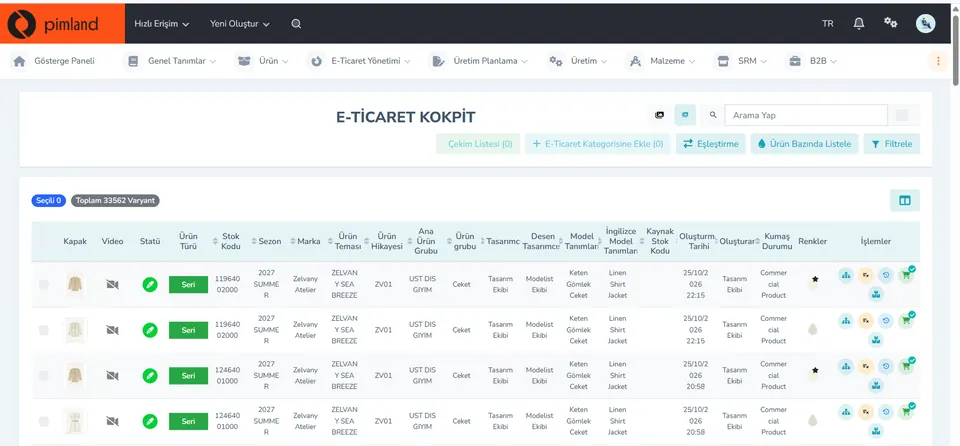
Screen from the demo environment; brands and amounts are demo data. Step 1Manage variants in the cockpit
The cockpit shows all variants in a single list. At the top are the actions add to e-commerce category, matching, list by product and filter; the icons at the end of each row are for variant-level actions.
In real working life, if a variant's cover image or color is missing, it shows up wrong in the channel. Before going live, filter the list by missing fields.
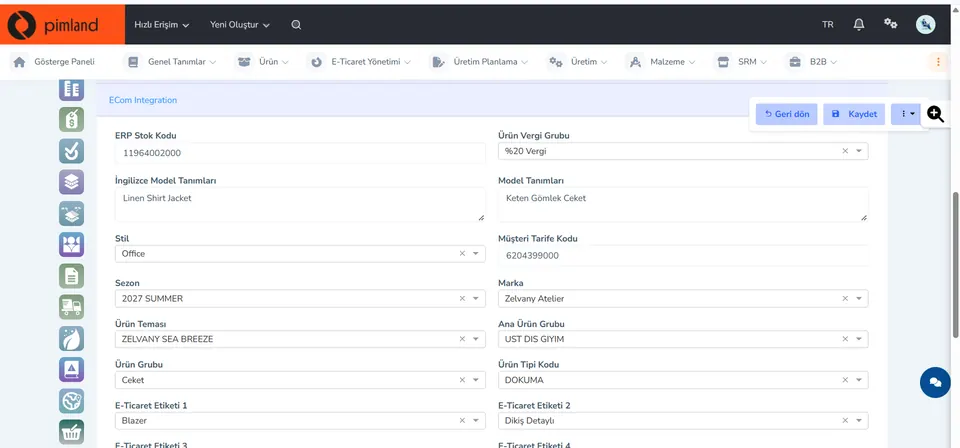
Screen from the demo environment; brands and amounts are demo data. Step 2Fill in the attributes
In the ECom Integration tab: ERP stock code, product tax group, style description in Turkish and English, style, customer tariff code, season, brand, theme, product group and e-commerce tags. The information that helps filtering and search in the channel is in these fields.
In real working life, one empty field can make a product invisible in the category filter. Know the required fields channel by channel.
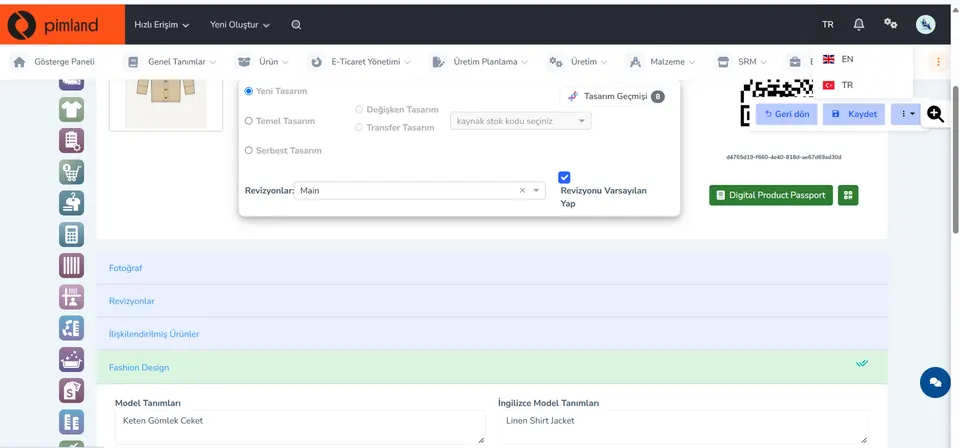
Screen from the demo environment; brands and amounts are demo data. Step 3Switch the language, check the content
On the product card you switch between EN and TR; the style description is kept in separate fields in the two languages. Photos, revisions and linked products are on the same card too.
In real working life, if different information is written in two languages, it's as if there were two separate products in two channels. Technical information comes from a single source; only the language changes.
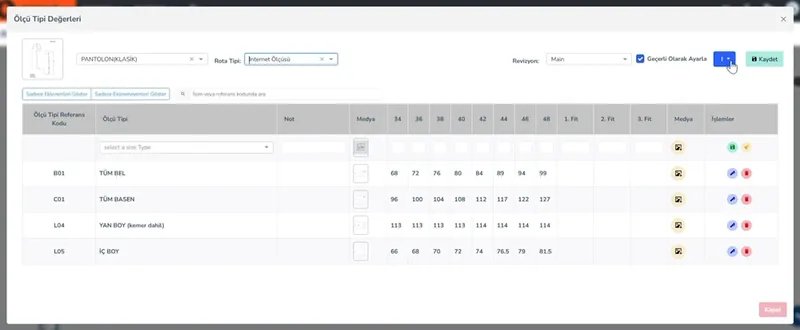
Screen from the demo environment; brands and amounts are demo data. Step 4Find the measurements that go to the customer
In the size chart, the route type 'Online Measurements' is selected: waist, hip, outseam and inseam by size. You take the measurements that go to the product card from this product development record; you don't rewrite them.
In real working life, the first barrier against size-related returns is a correct size chart.
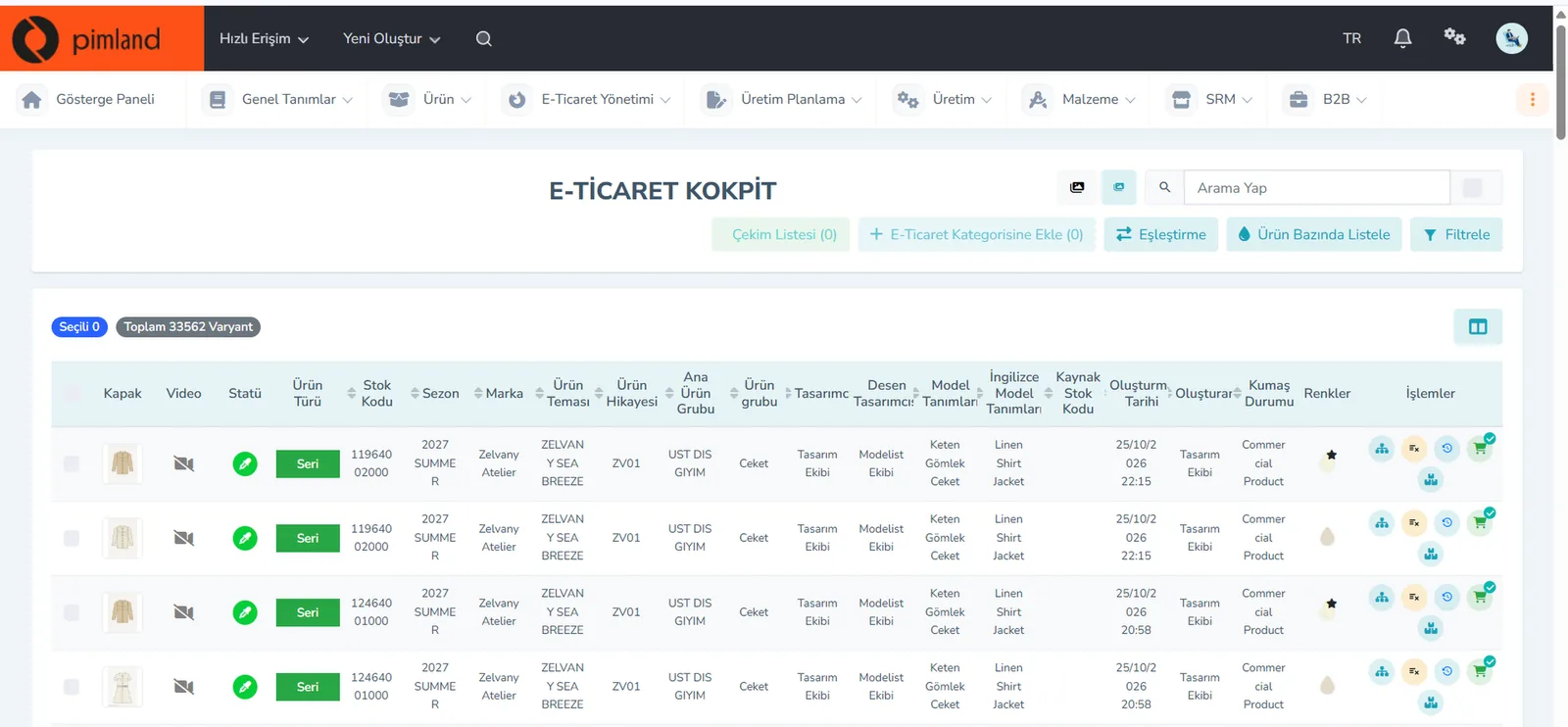


These screens are from the Pimland PIM module.
Open your card
Open your card
Read the short summary and the Pimland screens and answer at least 2 of 3 questions correctly to open the card. When all 20 cards are open, your Pimland Basic Certificate arrives in your account automatically.
How fashion, retail and manufacturing companies work, and 20 position cards
First the required reading, then the cards for 20 positions: you learn how a fashion company works.
- FirstTraining 1: How is a product born? · read to the end and complete it
- Each cardA summary of the position, audio narration and Pimland screens
- Card3 short questions at the end of each part; 2 correct answers open the next part · no time limit
- AccountWith a free account, your progress follows you on every device
- At the endOnce you complete all 20 cards, the Pimland Basic Certificate arrives in your account automatically
Certificate 1 · Pimland Basic Certificate
Reading is open to everyone; the part questions and the certificate require an Academy account.
PLM, PIM and SRM trainings
The shared language of the fashion world: PLM, PIM and SRM, with Pimland's real screens.
- OrderFirst PLM, then PIM, then SRM · one at a time
- Each training8 parts, in order · audio narration and Pimland screen
- Questions3 questions at the end of each part, 24 in total · 2 correct answers open the next part · no time limit, the questions change with every attempt
- UnlockPart questions open after your Basic certificate
- Verification14+ (date of birth in your profile); an e-Devlet education document for Turkish nationals
- At the endOnce the three trainings, ID and document are complete, Certificate 2 arrives in your account
Certificate 2 · Pimland PLM · PIM · SRM Certificate
Reading is open to everyone; the part questions and the certificate require an Academy account.
PRO · advanced training
Separate application, for selected candidates.
- WhoCandidates selected from applicants who hold both certificates
- OnlinePimland PLM software training and test
- On site1 day inside a fashion company, seeing PLM in use
- ApplicationWith “Apply for PRO training” on the PRO page; places are limited, and selected candidates hear back by email
Certificate 3 · Pimland PRO Certificate
Reading is open to everyone; the part questions and the certificate require an Academy account.
FAQFrequently asked questions about the e-commerce specialist
4 questions
Title and description, fabric content, care instructions, measurement chart and fit information, model information, images, color and size variants, price and stock. The technical part comes from the tech pack and the BOM.
The rate showing how many of the visitors to a product page or the site go on to buy. It is read together with the add-to-cart rate and the return rate.
Keeps product information, images and multilingual content in one hub and sends them to the channels from there. You don't have to type the same information into each channel's panel separately.
Business administration, marketing, e-commerce and digital marketing are common. In fashion e-commerce, Excel, analytical thinking, writing short and clear product copy, and knowledge of fabric, fit and size make a difference.
· Pimland Academy team