What does an e-commerce operations specialist do?
DepartmentMarketing and e-commerceModulePIM
The e-commerce operations specialist is the person who runs a fashion brand's online orders from leaving the warehouse through packing, shipping and returns, and makes sure the stock in the channels shows correctly.
 Card: Locked · your progress is saved in this browser · save it to your account
 PIMLAND 16 · PIM
E-commerce operations specialist
Marketing and e-commerceE-commerce operations specialist, in short
The right parcel starts with the right stock code; every return is logged together with its reason.
- Makes sure orders are picked, packed and handed to the carrier on time.
- Checks returns and puts them back into stock; compares system stock with shelf stock.
- Season rhythm: warehouse receiving, the order queue every morning, campaign preparation, return flow, stock count.
- The most important documents are the order list, the pick list, the return reason record and the stock variance report.
- For every item, compare the stock code with the order by scanning the barcode.
- Judged on on-time shipping, accurate shipments, and system stock matching shelf stock.
- Order list
- Pick list
- Return form and return reason record
- Stock count and stock variance report
 E-commerce specialist
 Customer service representative
 Merchandiser
Read in detailall documents, workflow, cases
- Follows the orders coming in from the brand's own site and from marketplaces; makes sure each order is picked, packed and shipped on time.
- Checks at packing that the right product goes out in the right color and size, with the right invoice and undamaged.
- Monitors delays and delivery problems on the shipping side and works with the relevant teams to solve them.
- Receives returns, checks the product, puts sellable items back into stock and records the reason for the return.
- Compares the stock in the system with the stock on the shelf; finds count differences and makes sure only products that really exist show as on sale in the channels.
In a season
- Season launch
New products arrive at the warehouse; barcode and stock code matching is checked and shelf locations are opened.
- Every morning
Orders placed overnight are queued by carrier cut-off time; pending and delayed orders are set aside.
- Campaign period
The packing order, team plan, packaging materials and carrier handover times are prepared before the campaign.
- After the campaign
Returns come in; return receiving, inspection and restocking run in a steady flow.
- End of season
A warehouse stock count is done; system stock is compared with shelf stock, and the reasons for differences are written down.
Who do they work with?
- E-commerce specialist
- Customer service representative
- Merchandiser
 Store sales associate
 Quality control coordinator
 Product development specialist
From school to work
| What you learned at school | At work |
|---|---|
| You learn to draw a task step by step as a process. | At work, every online order is a process: the order coming in, picking, checking, packing, shipping, delivery. When a step breaks down, your process drawing shows where it broke down. |
| You get to know Excel and basic computer applications. | At work, order, shipping and return lists are put into a spreadsheet every day. One e-commerce warehouse ad asks only for 'basic computer skills'; using Excel well puts you a step ahead. |
| You learn to recognize fabrics, sizes and product features. | At work, this knowledge pays off at the packing table: telling two similar colors apart, reading the size correctly from the label, understanding the condition of a returned item. |
| You learn the basic principles of customer satisfaction. | At work, the customer doesn't see you but does see the parcel. The right product, a clean parcel and on-time shipping are the moment the brand touches the customer. |
| You get to know the concepts of stock and inventory. | At work, stock lives in two places: in the system and on the shelf. Keeping the two the same is your job; every product shown in the system also being on the shelf means the order goes out without trouble. |
What do job ads ask for?
From 242 fashion and retail job ads published in Turkey in August–October 2026.
Entry point
Among the 242 ads we examined, 10 of the 12 ads in the warehouse, logistics and shipping family have entry-level titles. In the sample, this is the family most open to applicants without experience.
Marketplace panel and order process
17 of the 26 ads in the e-commerce and marketplace family ask for marketplace panels by name. One e-commerce warehouse ad looks for 'basic knowledge of marketplaces and order processes'.
Excel and systems knowledge
Excel appears in 38% of the 242 ads. One e-commerce operations specialist ad invites candidates who are 'familiar with or willing to learn' platforms and integration systems.
Pace and teamwork
Of the 26 ads in the e-commerce and marketplace family, 11 mention teamwork and 8 a fast, busy pace.
Experience
64 of the 84 entry-level ads (76%) state no years of experience or ask for at most 1 year. One labeling and product preparation ad says 'experienced or inexperienced candidates can apply'.
The first 90 days
- Walk an order's path from start to finish: note every step and its owner, from the order coming into the system to carrier delivery.
- Learn the warehouse shelf layout and how stock codes are read; make telling similar colors and sizes apart a habit.
- Read the weekly return list with its reasons; pass the most frequent reasons to the e-commerce specialist and customer service.
Which field of study?
Job ads emphasize basic computer skills, Excel and marketplace panel knowledge more than a specific department. Logistics, business administration, e-commerce, international trade and industrial engineering are close to this position. Most people start as e-commerce or warehouse staff; learning operations from the inside is the foundation of expertise.
Turning an order on the screen into the right parcel at the customer's door.
From the inside: documents, decisions, cases
Documents, handovers, decisions and mistakes that happen on the job.
A working day
- 08.30
You open the orders placed overnight: the brand's own website and the marketplaces on separate lists. You set the priority order by carrier cut-off time.
- 09.15
You give the pick list to the warehouse team. If a product shows in the system but can't be found on the shelf, you set it aside and look into the reason.
- 10.30
At the packing table, you do spot checks: color, size, stock code, invoice and parcel. An order where two similar colors got mixed up is caught and corrected.
- 11.30
You check pending orders and cancellation requests on the marketplace panels; you process the cancellation of an order that hasn't shipped yet.
- 13.30
Return receiving: you open incoming parcels and check the label and the item's condition. You put sellable items back into stock, set defective ones aside, and enter the return reason in the system.
- 14.30
You talk to the carrier about undeliverable shipments; you pass orders with address problems to customer service.
- 16.00
For the weekend campaign, you discuss with the e-commerce specialist which products will be in the campaign, their stock and the packing plan.
- 17.00
End-of-day summary: orders shipped, pending and returned. You pass stock differences to the planning specialist.
A sample day; hours vary by company and season.
Workflow: before you, after you
- 1Receive the new product into the warehouse
- Input
- Shipment list, barcodes and stock codes
- Output
- Product with a shelf location, entered into the system; list of mismatched codes
- Handover
 Planning specialist
- 2Verify channel stock
- Input
- Warehouse stock, channel stock report
- Output
- Corrected stock; list of products to be closed for sale
- Handover
- E-commerce specialist
- 3Pick the order, pack it, hand it to the carrier
- Input
- Order list, pick list
- Output
- Checked parcels; list of undeliverable shipments
- Handover
- Customer service representative
- 4Receive and sort the return
- Input
- Return parcel, return form
- Output
- Product put back into stock, list of defective products, return reason record
- Handover
- Quality control coordinator
- 5Report return reasons
- Input
- Weekly return records
- Output
- List of reasons by product and size; feedback for the product card and measurement information
- Handover
- E-commerce specialist
- 6Get ready for the campaign
- Input
- Campaign calendar, allocated stock
- Output
- Packing and team plan, carrier times; additional stock request
- Handover
- Planning specialist
- 7Do a stock count, close the gap
- Input
- System stock, shelf count
- Output
- Stock variance report and correction; weekly operations summary
- Handover
 Middle manager
Documents that pass through your hands
| Document | From | To | When | What for |
|---|---|---|---|---|
| Order list | The brand's own website and marketplace panels | E-commerce operations | Every day, several times a day | Which order will be picked, and with which carrier and when it will ship. |
| Pick list | E-commerce operations | Warehouse team | Every morning and before carrier pickups | Products to be picked by shelf location, stock code, color and size. |
| Invoice and shipping label | ERP and carrier integration | Packing | During packing | The parcel going to the right customer with the right documents. |
| Shipment and stock allocation list | Planning specialist | E-commerce operations | Every week and before campaigns | Products coming to the e-commerce warehouse and the stock allocated for the campaign. |
| Return form and return reason record | Customer (with the parcel) and customer service | E-commerce operations | When a return arrives | Recording the reason for the return, the condition of the item and whether it will be put back into stock. |
| Stock count and stock variance report | E-commerce operations | Planning specialist and e-commerce specialist | At periodic counts and when needed | Showing the difference between system stock and shelf stock, and its reason. |
| Weekly operations summary | E-commerce operations | Middle manager | Every week | Orders shipped on time, late deliveries, return reasons and stock differences. |
Decisions
- Putting an incoming return back into stock or setting it aside as defectiveApproved by: You decide; when you're unsure about an item, you ask quality control.
- Changing order priority based on carrier cut-offApproved by: You; for campaign orders, you inform the e-commerce specialist.
- Having a product that can't be found on the shelf closed for sale in the channelApproved by: You suggest it; the e-commerce specialist closes it in the channel, and the planning specialist corrects the stock record.
- Escalating a recurring carrier problemApproved by: The middle manager decides; you prepare the records and examples.
What are you evaluated on at work?
- Orders handed to the carrier on time
- Orders shipped wrong or incomplete
- Return processing speed and recording of return reasons
- Difference between system stock and shelf stock
- Customer feedback about delivery
Common mistakes on the job
Checking an item at packing just by how it looks.
ResultTwo similar colors or two sizes get mixed up; the customer receives a different product, and a return and a second shipment follow.
PreventionFor every item, compare the stock code on the label with the order; check by scanning the barcode.
Not recording the reason when putting a return back into stock.
ResultThe same reason repeats for the same product; the size chart or product card can't be corrected in time.
PreventionFor every return, record the reason and the item's condition by choosing from a standard list.
Correcting a count difference without looking into its reason.
ResultThe difference shows up again at the next count; its source (wrong shelf, faulty receiving, loss) can't be found.
PreventionReport every difference together with its reason; turn a recurring reason into a process change.
Not checking packaging materials and the team plan before a campaign.
ResultWhen orders rise, packing slows down and carrier pickups slip.
PreventionGet the campaign calendar in advance; plan materials, team and carrier times together.
Putting a defective return on the same shelf as sellable stock.
ResultThe defective item is sold again, and a second return comes in.
PreventionUse a separate shelf and a separate stock status for defective items.
Case: what would you do?
Case 1On a campaign morning, a dress is still selling on a marketplace; the system shows stock, but no item in that size can be found on the shelf.What do you do?
A good answerFirst you check whether the size was put on another shelf or in the returns area. If it can't be found, you ask the e-commerce specialist to close the size for sale in the channels right away, and you inform customer service about incoming orders. At the end of the day, you look into the reason for the difference and pass the stock correction to the planning specialist.
Every minute it stays on sale brings a new order that can't be shipped. First you stop new orders, then you find the reason.
Case 2Lately, returns of the same jacket keep coming in one after another with the reason 'size too small'.What do you do?
A good answerYou check the returns and put the sellable ones back into stock. You list the reasons by product and size, pass them to the e-commerce specialist and suggest checking the size chart and the fit note on the product card.
Operations is where returns are seen first. Collecting the reasons and passing them to the right team prevents the same return from repeating.
Case 3Carrier pickup is close; at the packing table, the color on an order's invoice is different from the color of the item in the parcel.What do you do?
A good answerYou hold the parcel and compare the stock code on the order with the item on the shelf. You find the right item and repack the parcel; if it won't make the pickup, you move the order to the next carrier pickup and note the delay for customer service.
A wrong item means a return, a second shipment and lost customer trust. A short delay is a smaller cost.
Think of your own answer first, then open it.
How does this position work with the world?
At brands that sell abroad, e-commerce operations also work with shipping, customs and return rules that change by country; English terms such as fulfillment, picking, packing, cross-border and return rate are the everyday language of the job. For products going to the EU, product and care information travels with the product; the digital product passport carries this information to the customer's phone through a QR code. When the stock code is born in PLM and stays the same in PIM and ERP, the warehouse, the channel and the customer are talking about the same product.
What changes with PLM?
| Before | With PLM |
|---|---|
| The stock code in the channel and the stock code in the warehouse are kept in separate spreadsheets; a mismatch is often noticed through an order cancellation. | The product's ERP stock code sits in the product record; the information going to the channel and the warehouse record are fed from the same code. |
| Return reasons stay in a returns spreadsheet and reach the product team late. | The return reason is recorded with the product's stock code; the product team makes the correction by looking at the same product record. |
| Whether a product is ready for sale is asked by email. | The status bar on the product card shows which stage the product is at; you move what's ready for sale to the sales shelf. |
Career path
- E-commerce or warehouse staff
- E-commerce operations specialist
- Senior e-commerce operations specialist or operations coordinator
- Middle manager (e-commerce operations or logistics)
Glossary for this position
- SKU (stock keeping unit)
- The code that uniquely identifies each product option held in stock.
- Barcode
- The sequence of code and bars that lets a product option be read by machine at the checkout, in the warehouse and during stock counts.
- Variant
- Each sellable option of the same style, distinguished by attributes such as color and size.
- ERP
- Enterprise resource planning: the system that records the company's operations such as stock, sales, purchasing and accounting.
- PIM
- Product information management: the system that gathers the information, images and multilingual content a product needs for sale in one hub and sends it to the channels.
- E-commerce cockpit
- The PIM screen that shows all variants of a product in one list, with status, season, image and channel actions.
- Measurement chart
- A chart showing the target value of each measurement point of a style, size by size.
- DPP (digital product passport)
- A structure that links a product's identity, material, care and end-of-life information to a digital record opened by a QR code on the product.
- Drop
- Releasing a collection for sale in parts on set dates, rather than all at once.
- Markdown (discount)
- Lowering the price of a product whose sales fall below expectations.
What does the work look like on screen?
The e-commerce operations specialist's stop in Pimland is the product's identity: stock code, variant, status. The right parcel starts with this information being right.
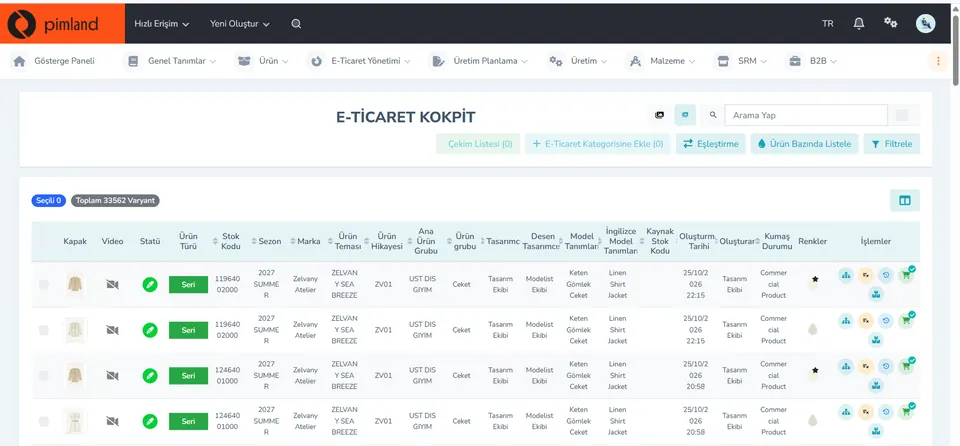
Screen from the demo environment; brands and amounts are demo data. Step 1Recognize variants by stock code
The cockpit lists products by variant: cover image, status, product type, stock code, season, brand, product theme, main product group, product group, colors. At the top are the total number of variants and a filter.
In real working life, the item at the packing table and the variant on the order carry the same stock code. Telling two similar colors apart from the cover image reduces wrong shipments and returns.
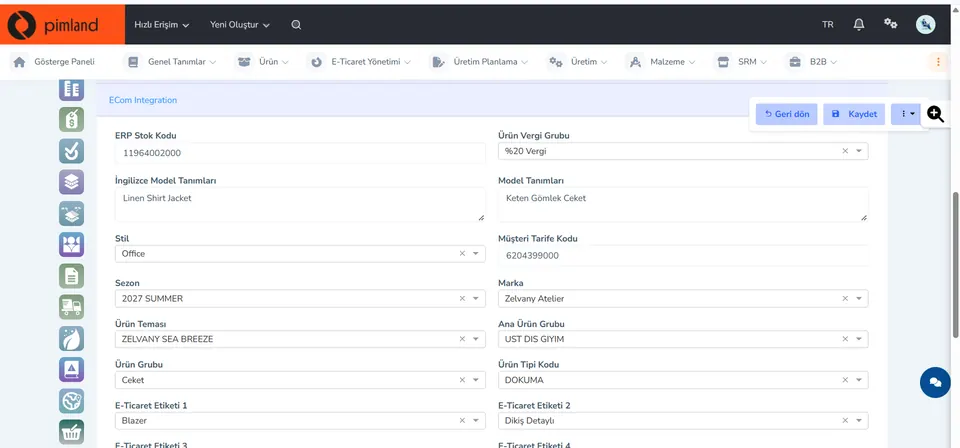
Screen from the demo environment; brands and amounts are demo data. Step 2Find the ERP stock code
In the ECom Integration tab, the ERP stock code, product tax group, style description in Turkish and English, style, season, brand, theme, product group and e-commerce tags sit side by side.
In real working life, stock in the channels is matched by the ERP stock code. When the code is the same in every system, the item in the warehouse also shows in the channel with the right quantity.
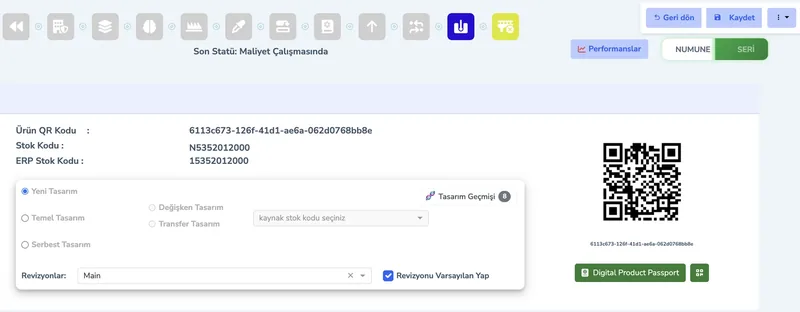
Screen from the demo environment; brands and amounts are demo data. Step 3Read the product's status
At the top of the card are the status bar and the latest status; here you see which stage of its journey the product is at. The same card also has the product QR code and the Digital Product Passport button.
In real working life, a product can arrive at the warehouse before it goes on sale. You check its status and move what's ready for sale to the sales shelf.
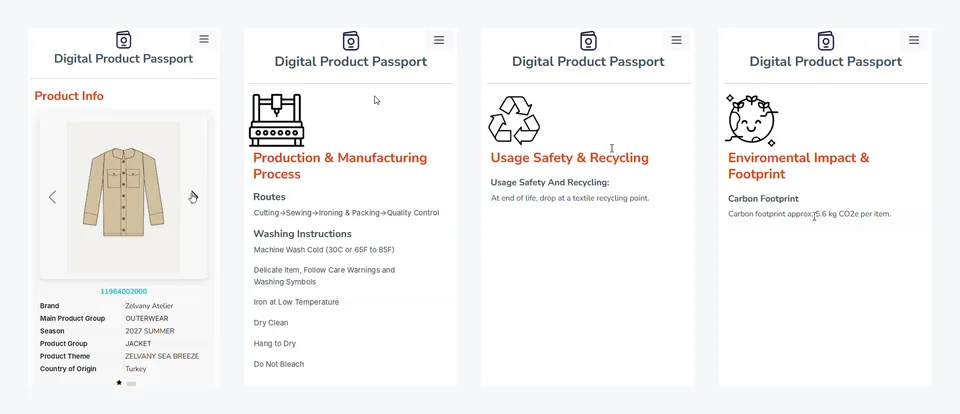
Screen from the demo environment; brands and amounts are demo data. Step 4See the page the QR code on the product opens
The QR code on the product opens the digital product passport on a phone. Four sections: product information, production and care, safe use and recycling, environmental impact.
In real working life, the customer reaches product and care information through this code. For a returned item, you check that the label and the code are in place; the item goes back on sale with this information.
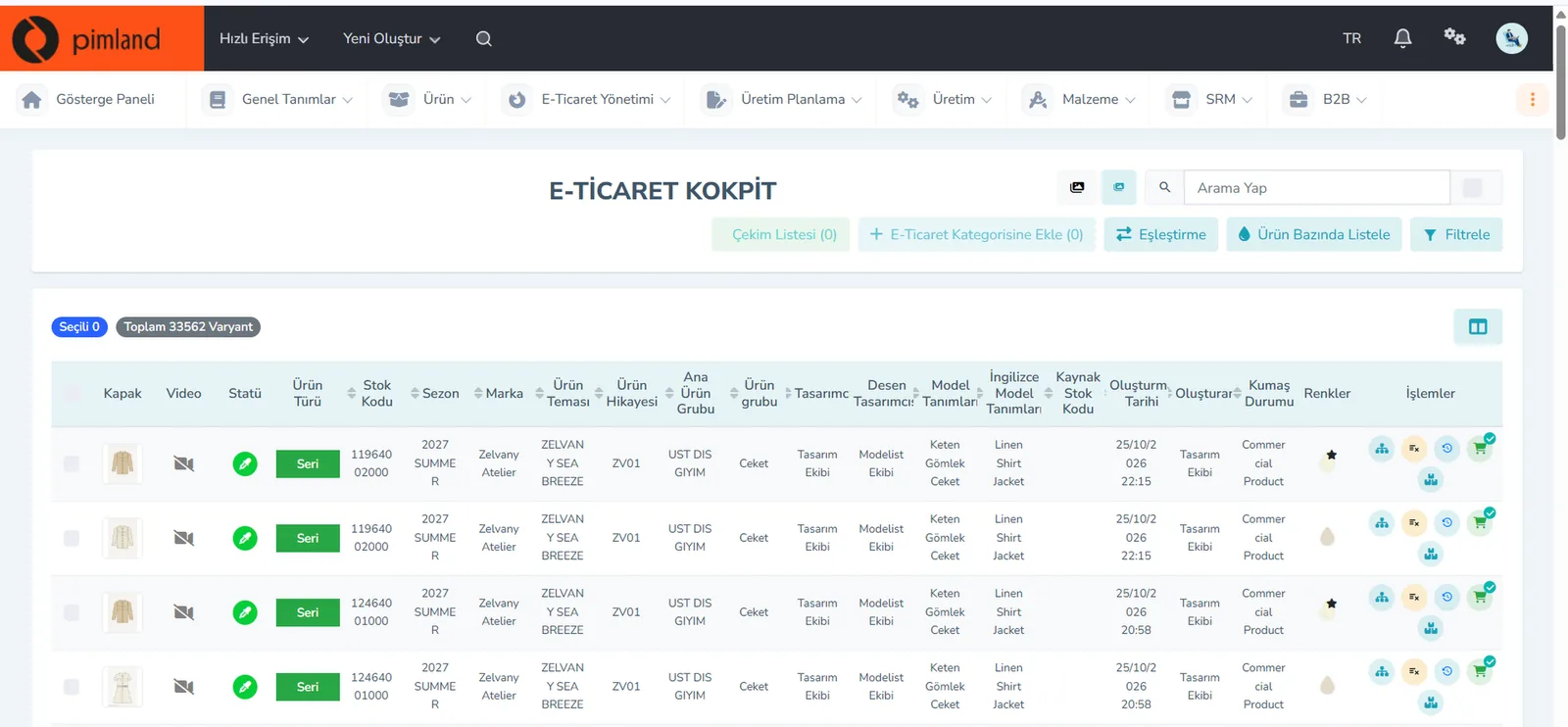


These screens are from the Pimland PIM module.
Open your card
Open your card
Read the short summary and the Pimland screens and answer at least 2 of 3 questions correctly to open the card. When all 20 cards are open, your Pimland Basic Certificate arrives in your account automatically.
Your e-commerce operations specialist card is open · 0/20
Next suggestion: All position cards
How fashion, retail and manufacturing companies work, and 20 position cards
First the required reading, then the cards for 20 positions: you learn how a fashion company works.
- FirstTraining 1: How is a product born? · read to the end and complete it
- Each cardA summary of the position, audio narration and Pimland screens
- Card3 short questions at the end of each part; 2 correct answers open the next part · no time limit
- AccountWith a free account, your progress follows you on every device
- At the endOnce you complete all 20 cards, the Pimland Basic Certificate arrives in your account automatically
Certificate 1 · Pimland Basic Certificate
Reading is open to everyone; the part questions and the certificate require an Academy account.
PLM, PIM and SRM trainings
The shared language of the fashion world: PLM, PIM and SRM, with Pimland's real screens.
- OrderFirst PLM, then PIM, then SRM · one at a time
- Each training8 parts, in order · audio narration and Pimland screen
- Questions3 questions at the end of each part, 24 in total · 2 correct answers open the next part · no time limit, the questions change with every attempt
- UnlockPart questions open after your Basic certificate
- Verification14+ (date of birth in your profile); an e-Devlet education document for Turkish nationals
- At the endOnce the three trainings, ID and document are complete, Certificate 2 arrives in your account
Certificate 2 · Pimland PLM · PIM · SRM Certificate
Reading is open to everyone; the part questions and the certificate require an Academy account.
PRO · advanced training
Separate application, for selected candidates.
- WhoCandidates selected from applicants who hold both certificates
- OnlinePimland PLM software training and test
- On site1 day inside a fashion company, seeing PLM in use
- ApplicationWith “Apply for PRO training” on the PRO page; places are limited, and selected candidates hear back by email
Certificate 3 · Pimland PRO Certificate
Reading is open to everyone; the part questions and the certificate require an Academy account.
FAQFrequently asked questions about the e-commerce operations specialist
4 questions
Runs the online order's journey from the warehouse to the customer: picking, packing, shipping, delivery and returns. Also makes sure the stock information in the channels stays the same as the real stock in the warehouse.
The e-commerce specialist prepares the product for sale and publishes it: product card, images, price, campaigns. The operations specialist makes sure the sold product reaches the customer correctly and on time, and that returns are processed properly. One is the shop window side, the other the delivery side.
This field is one of the most open to entry-level candidates. Among the 242 job ads we reviewed, 10 of the 12 ads in the warehouse, logistics and shipping family carry entry-level titles. Basic computer skills, Excel and marketplace panel knowledge are a good start for the first step.
When the stock in the system matches the stock on the shelf, the product the customer bought really ships and every product that can be sold stays on sale. Regular counts and the correct stock code keep the two stocks the same.
· Pimland Academy team