What does a digital marketing and content specialist do?
DepartmentMarketing and e-commerceModulePIM
The digital marketing and content specialist is the person who tells the story of a fashion brand's new products on social media, in campaigns and in product content, takes the launch to the channels and measures the result.
 Card: Locked · your progress is saved in this browser · save it to your account
 PIMLAND 14 · PIM
Digital marketing and content specialist
Marketing and e-commerceDigital marketing and content specialist, in short
Content is tied to the product calendar; the information comes from the product record, the yardstick from sales.
- Builds a content calendar tied to the product calendar and brings the launch to every channel on the same day.
- Prepares product content from the product record and plans campaigns with e-commerce and the merchandiser.
- Season rhythm: season plan, pre-launch preparation, launch week, mid-season, special days, report.
- The most important documents are the drop calendar, the content calendar, the content brief and the performance report.
- Track content by product code, and read the results together with sales data.
- Judged on content going live the same day as the product, and on how it converts to sales.
- Season and drop calendar
- Content calendar
- Content brief
- Performance report
 E-commerce specialist
 Stylist
 Merchandiser
Read in detailall documents, workflow, cases
- Builds a content calendar tied to the season's product calendar: which product, which day, which channel, which format.
- Takes the product launch to the channels: social media posts, short videos, e-mail, the site homepage and campaign visuals tell the same story on the same day.
- Prepares or edits product content: title, short description, outfit suggestion, images and video; takes the information from the product record.
- Plans campaign and special-day content together with e-commerce and the merchandiser.
- Reads reach, engagement, clicks and conversion to sales; reports which content sells the product and changes the next plan accordingly.
In a season
- Season plan
The collection calendar and drop dates are confirmed; the content calendar is built around these dates.
- Pre-launch
Content needs are added to the shoot list; images, videos and product copy are gathered.
- Launch week
Posts, campaign and website visuals go live at the same time; the response in the first days is watched closely.
- Mid-season
Products that sell well are pushed forward; for products moving slower than expected, new outfit pairings and a new story are tried.
- Special days and sales
Campaign content is matched with price and stock information; sold-out sizes or colors are taken out of the content.
- End of season
A report is prepared on which content type sold the product; the lesson is written into the next season's calendar.
Who do they work with?
- E-commerce specialist
- Stylist
- Merchandiser
 Collection manager
 Fashion designer
 Sustainability specialist
 Customer service representative
From school to work
| What you learned at school | At work |
|---|---|
| You learn to tell an idea with visuals and short copy. | At work, that story is tied to a product. Behind every post there is a product code, a color and a launch date. |
| You get to know tools like Photoshop and Illustrator and make your first designs. | At work, these tools become part of your daily routine; Photoshop appears in half of the social media job ads. Producing fast and in line with the brand's visual language becomes your most useful skill. |
| You learn to follow trends and read the fashion world. | At work, you bring the trend together with the brand's own product. Which product is selling this season, and how do you dress it in the trend: that's where content comes from. |
| You learn the basic concepts of marketing and consumer behavior. | At work, you measure the result of every piece of content: how many people it reached, how many clicked, what happened on the product page. Sales are discussed as much as likes. |
| You learn to share tasks in team projects. | At work, in a launch the stylist, e-commerce, the merchandiser and customer service all work to the same calendar. Your calendar makes sure everyone is ready on the same day. |
What do job ads ask for?
From 242 fashion and retail job ads published in Turkey in August–October 2026.
Separate job ad
In the sample of 242 job ads, there are 10 unique ads in the digital marketing, social media and content family; all are non-managerial, and 2 have entry-level titles. 4 are workshop and manufacturer ads: manufacturers are also hiring for social media and video.
Trend and market research
It appears in 8 of these 10 ads.
Photoshop and Illustrator
Photoshop is asked for in 5 of the 10 ads, Illustrator in 3, and a portfolio in 3.
Season calendar
4 of the 10 ads mention a season calendar or delivery date: content works tied to the product calendar.
In other positions too
Social media and content skills appear in 6% of the 242 ads (15 ads); so it's a skill asked for not only by this position but also by graphic design and e-commerce ads.
The first 90 days
- Study the brand's posts and campaigns from the last two seasons; match which content belongs to which product.
- Learn this season's collection calendar and drop dates; build your own content calendar on top of these dates.
- Write a one-page report every week: which content, which product, what result, what changes next time.
Which field of study?
Public relations and advertising, new media, communication design, graphic design, marketing and fashion design are common backgrounds. What counts is your portfolio and knowing the product: knowledge of fabric, fit, color and size makes fashion content stronger.
Turning a new product into the product everyone talks about on the day it hits the shelf.
From the inside: documents, decisions, cases
Documents, handovers, decisions and mistakes that happen on the job.
A working day
- 09.00
You look at the results of yesterday's posts: reach, engagement, clicks to the product page. You note the content that stood out and the content that fell behind.
- 09.30
Short meeting with e-commerce: which product sold yesterday, which size sold out. You take the sold-out product out of today's plan.
- 10.30
You compare the week's content calendar with the season calendar; if a drop date has shifted, you shift the posts too.
- 11.30
With the stylist, you add content needs to the shoot list: which product for the short video, which outfit, which angle.
- 13.30
You write the product copy; you take the fabric, color and care information from the product card.
- 15.00
You select campaign images and videos and have them prepared in each channel's formats; before publishing, you check the copy and the price once more.
- 16.30
You go through incoming comments and messages; you pass frequent product questions to customer service and e-commerce.
- 17.30
You load tomorrow's posts into the scheduler and list the pending approvals.
A sample day; hours vary by company and season.
Workflow: before you, after you
- 1Build a content calendar from the season calendar.
- Input
- Season and drop calendar
- Output
- Content calendar by product and day
- Handover
- Collection manager
- 2Add content needs to the shoot list.
- Input
- Content calendar, product list
- Output
- Content brief
- Handover
- Stylist
- 3Write the product copy from the product record.
- Input
- Product card, multilingual content
- Output
- Channel copy and outfit suggestions
- Handover
- E-commerce specialist
- 4Match the store window with the digital launch.
- Input
- Launch visuals, window plan
- Output
- A window and a post telling the same story
- Handover
 Visual merchandiser (VM)
- 5Take the launch live, collect frequent questions.
- Input
- Approved content, campaign brief note
- Output
- Live content; a list of customer questions
- Handover
- Customer service representative
- 6Measure the result, give data to the product decision.
- Input
- Content results, sales data
- Output
- Performance report and recommendation
- Handover
- Merchandiser
Documents that pass through your hands
| Document | From | To | When | What for |
|---|---|---|---|---|
| Season and drop calendar | Collection manager and merchandiser | Digital marketing and content specialist | At the start of the season, and whenever it changes | Which product group goes on sale on which day. The content calendar is built on top of this. |
| Content calendar | Digital marketing and content specialist | Stylist, e-commerce, customer service | Before the launch | Which product is posted, on which channel, in which format, every day. Everyone knows the same date. |
| Content brief | Digital marketing and content specialist | Stylist, photographer, video team | Before the shoot | Product code, feature to highlight, required shots and video length, channel formats. |
| Brand and style guide | Brand team | Digital marketing and content specialist | At the start of the season | The brand's voice, visual language, and the phrases it uses and doesn't use. |
| Campaign brief note | E-commerce and merchandiser | Digital marketing and content specialist | Before the campaign | Products in the campaign, price, start and end date. Every number in the content comes from here. |
| Performance report | Digital marketing and content specialist | Merchandiser, e-commerce, your manager | Weekly and at the end of the season | Which content brought interest and sales to which product; a recommendation for the next plan. |
Decisions
- Content format, channel and posting time for a product.Approved by: Your decision; it stays within the brand guide and the content calendar.
- Taking a sold-out or low-stock product out of content and putting another product in its place.Approved by: You suggest it; you choose the replacement product together with the merchandiser and e-commerce.
- Price, discount and dates in the campaign copy.Approved by: E-commerce and the merchandiser approve; you write them exactly as in the campaign brief note.
- A phrase that highlights the product's sustainability or material feature.Approved by: The sustainability specialist and the product team approve it based on the product record.
What are you evaluated on at work?
- The content calendar going live on the same day as the product calendar
- Visits the content brings to the product page, and conversion to sales
- Product information given correctly in the content
- Campaigns opening on time and at the right price
- Recommendations from reports being used in the next plan
Common mistakes on the job
Copying product copy from an old post instead of the product card.
ResultThe fabric or color information differs from the product being sold; customer questions and returns follow.
PreventionAlways take technical information from the product record; only build the story yourself.
Continuing to promote a sold-out product.
ResultInterest comes but no sales; the customer can't find the product.
PreventionGet the stock status from e-commerce every morning and update the plan accordingly.
Not updating the content calendar when a drop date shifts.
ResultThe post goes live before the product is on sale; the link leads to an empty page.
PreventionCheck the season calendar once a week; tie the post to the product's go-live date.
Measuring results by likes alone.
ResultThe content type that brings sales stays invisible; the budget goes to the wrong place.
PreventionTrack content by product code, and read it together with sales data.
Posting without matching the image to the variant.
ResultThe color in the post turns out different from the product in the link.
PreventionTake the image from DAM in its tagged form; link the product and variant code to the copy and the link.
Case: what would you do?
Case 1A dress launches tomorrow morning. In the evening, e-commerce tells you that one of the two colors hasn't arrived at the warehouse and won't go on sale. The image in the post shows both colors together.What do you do?
A good answerYou update the post with the color that is on sale; if DAM has a single image of that color, you use it. For the other color, you plan a separate 'coming soon' piece to be posted on the day it arrives at the warehouse.
If the customer can't find the color they saw in the post on the website, interest doesn't turn into sales.
Case 2You're writing the copy for a new jacket. The designer's presentation says 'water-repellent', but there's no such information on the product card.What do you do?
A good answerYou write with the information on the product card; if you want to add the feature, you ask product development for the fabric's test result. Once the information is in the record, you add it to the content too.
Everything said about the product must rest on the product record; a feature that isn't in the record means a promise to the customer.
Case 3In a campaign, the short videos got many views but sales were below expectations. The static product images got fewer views but brought more visits to the product page.What do you do?
A good answerYou compare the two content types by product code and write down the role of both in the report: video is strong for awareness, images for moving to purchase. For the next plan, you suggest adding a direct link to the product at the end of the video.
Views and sales answer different questions; reading them together leads to the right decision.
Think of your own answer first, then open it.
How does this position work with the world?
The language of digital marketing is largely English: reach, engagement, conversion, content calendar, brief, launch. At a brand that sells abroad, the same launch is published in different languages and on different countries' calendars; when product copy comes from a multilingual product record, the same information is given in every language. The product record born in PLM reaches content through PIM and DAM; together with the digital product passport, material and care statements also rest on this record.
What changes with PLM?
| Before | With PLM |
|---|---|
| Launch dates come by email; changes are heard late. | The season calendar is in one place everyone can see; when a date shifts, the content calendar is updated the same day. |
| Images are scattered in shared folders; finding the approved image in the right color takes time. | Images in DAM are filed by season and shoot type and tagged with the product code. |
| For product copy, fabric and care information is asked from teams one by one. | The information is ready on the product card in two languages; content turns it into a story. |
Career path
- Social media and content assistant
- Digital marketing and content specialist
- Senior digital marketing specialist
- Middle manager (digital marketing or brand communication)
Glossary for this position
- Drop
- Releasing a collection for sale in parts on set dates, rather than all at once.
- Capsule collection
- A small collection of a few pieces built around a specific theme or collaboration.
- Season (SS/AW)
- Grouping collections by selling period: Spring/Summer (SS) and Autumn/Winter (AW).
- DAM (digital asset management)
- The system that keeps product images, videos and files in one place, with folders, tags and product links.
- PIM
- Product information management: the system that gathers the information, images and multilingual content a product needs for sale in one hub and sends it to the channels.
- Multilingual content
- Keeping the names and descriptions on the same product card in more than one language, in separate fields.
- E-commerce cockpit
- The PIM screen that shows all variants of a product in one list, with status, season, image and channel actions.
- Variant
- Each sellable option of the same style, distinguished by attributes such as color and size.
- SKU (stock keeping unit)
- The code that uniquely identifies each product option held in stock.
- Sell-through (sales rate)
- The ratio of units sold in a period to units offered for sale in the same period.
- Markdown (discount)
- Lowering the price of a product whose sales fall below expectations.
- DPP (digital product passport)
- A structure that links a product's identity, material, care and end-of-life information to a digital record opened by a QR code on the product.
What does the work look like on screen?
For the digital marketing and content specialist, Pimland is the source of content: the date comes from the calendar, the image from DAM, the copy from the product card. In this round, you'll see where a launch's content material is gathered from.
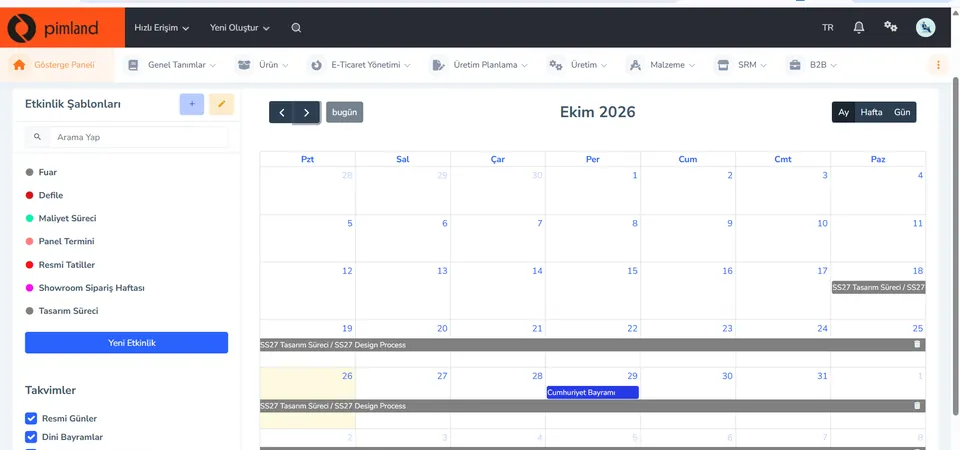
Screen from the demo environment; brands and amounts are demo data. Step 1Read the launch date from the calendar
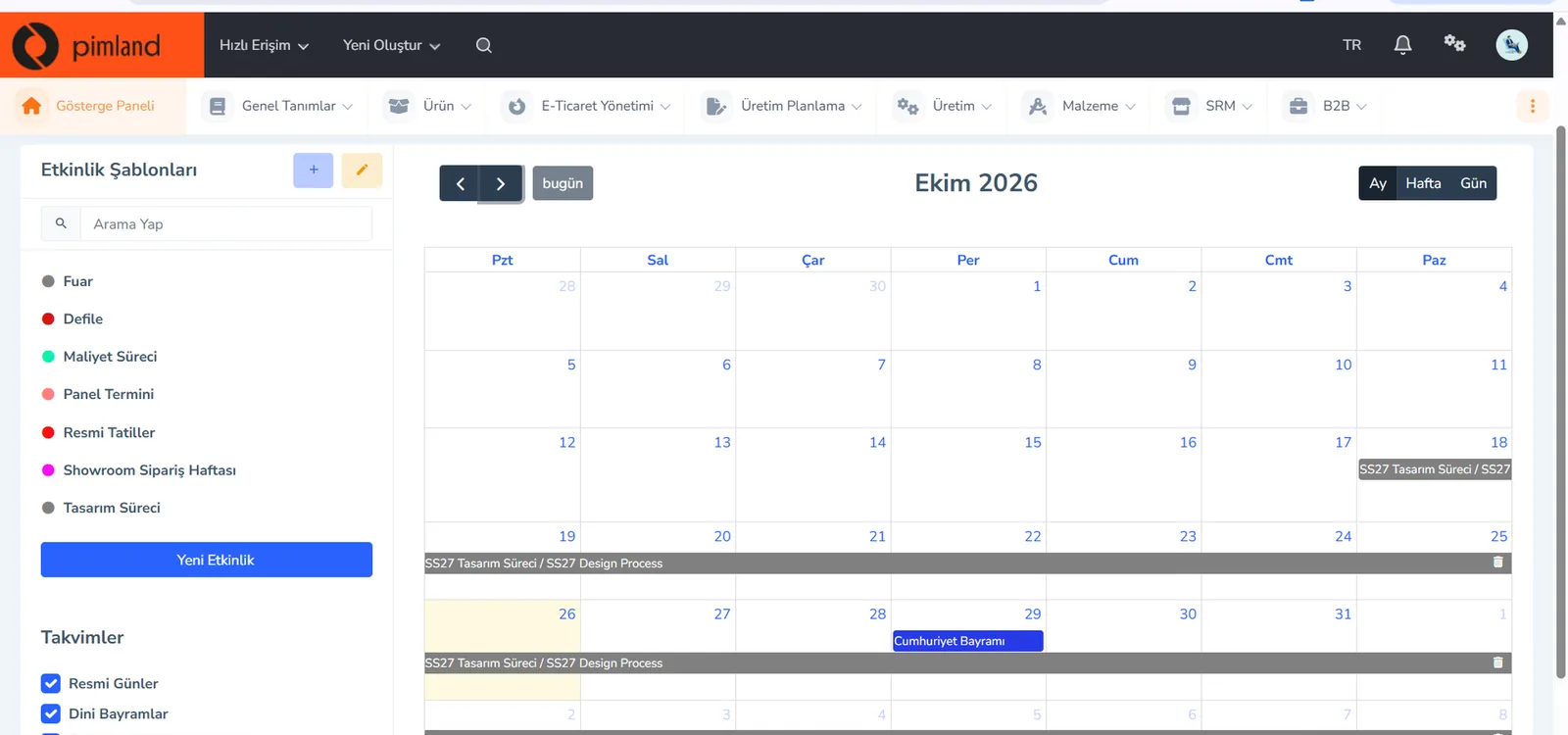
In the season calendar, event templates are on the left: trade fair, fashion show, costing process, panel deadline, showroom order week, design process. You open the calendar in month, week or day view; public holidays are in the same calendar.
In real working life, the content calendar is built on top of the product calendar. If a date shifts, your posting plan shifts too; check the calendar once a week.
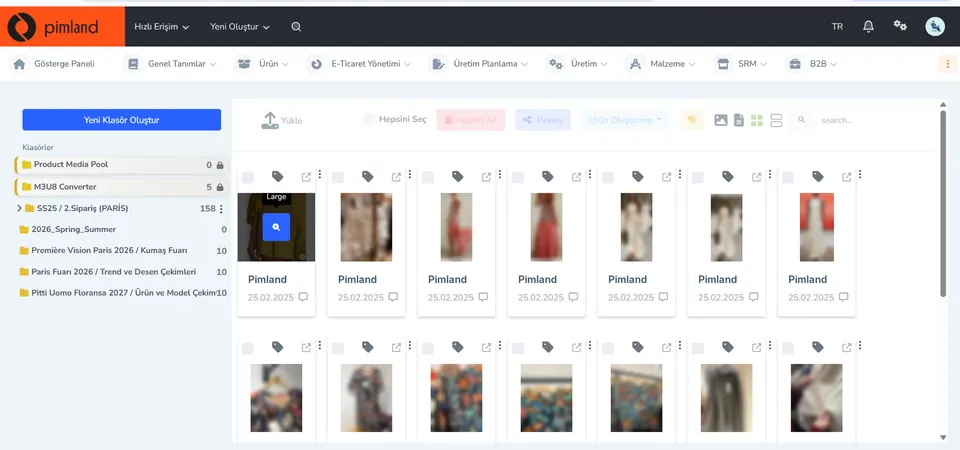
Screen from the demo environment; brands and amounts are demo data. Step 2Take the image from DAM
In digital asset management (DAM), images sit in folders: season, order, trade fair, trend and print shoots, product and model shoots. Upload, share, tag and create product actions are at the top. The photos on this screen are blurred for privacy.
In real working life, you take the campaign image from the right folder, in its approved version. A tagged image tells you itself which product it belongs to.
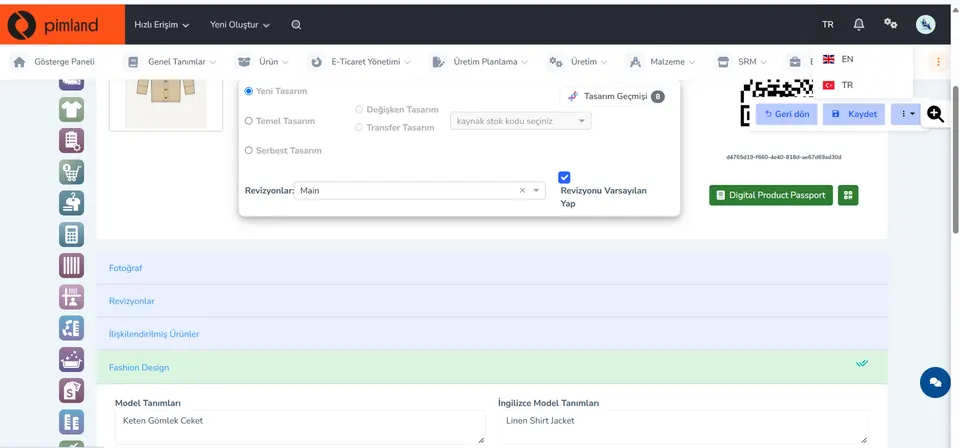
Screen from the demo environment; brands and amounts are demo data. Step 3Check the source of the product copy
On the product card you switch between EN and TR; the style description is kept in separate fields in the two languages. Photos, revisions and linked products are on the same card too.
In real working life, the fabric and color information in the post copy must match the product card. Linked products are also a ready starting point for outfit suggestions.
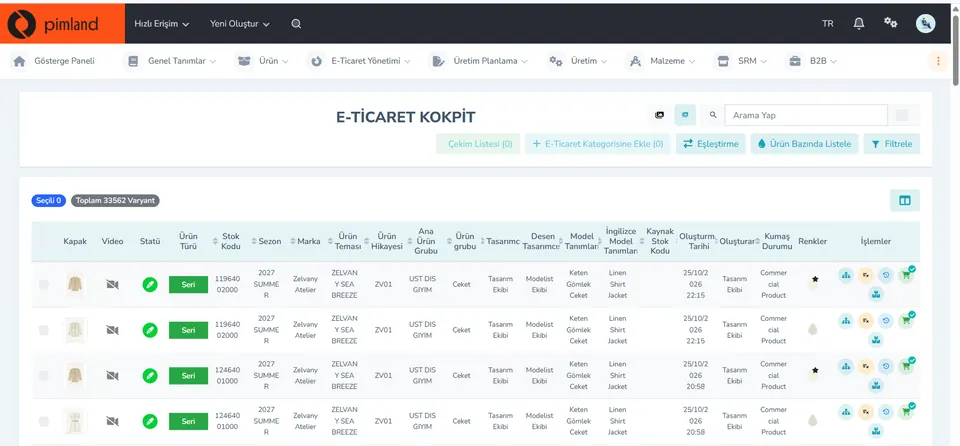
Screen from the demo environment; brands and amounts are demo data. Step 4See what's missing before the launch
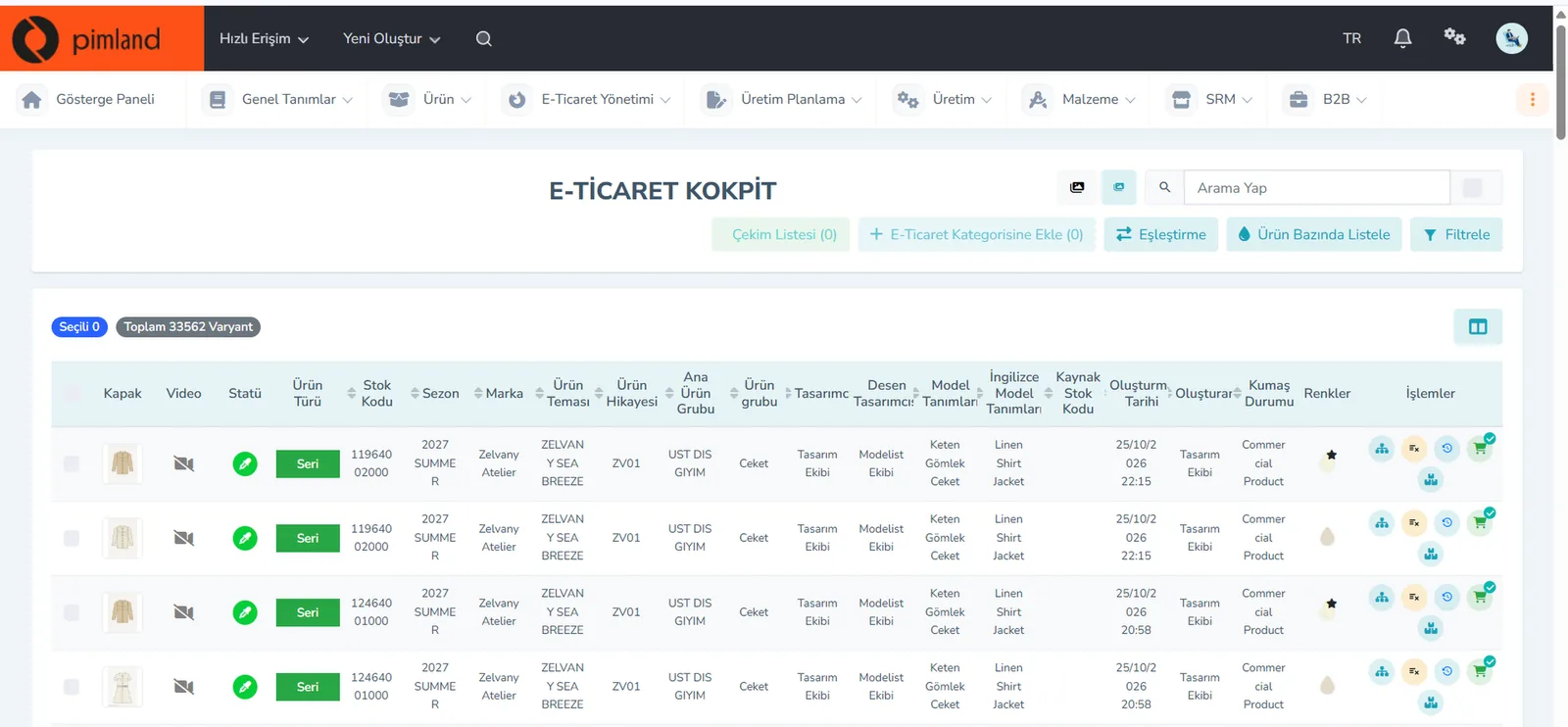
The top row of the cockpit shows the 'Shoot List' field and the number of selected variants. The list shows each variant's cover image, video status, color and status.
In real working life, on launch day one color's video may turn out to be missing. Before you schedule the post, check in the cockpit that every variant's image and video are ready.


These screens are from the Pimland PIM module.
Open your card
Open your card
Read the short summary and the Pimland screens and answer at least 2 of 3 questions correctly to open the card. When all 20 cards are open, your Pimland Basic Certificate arrives in your account automatically.
Your digital marketing and content specialist card is open · 0/20
Next suggestion: All position cards
How fashion, retail and manufacturing companies work, and 20 position cards
First the required reading, then the cards for 20 positions: you learn how a fashion company works.
- FirstTraining 1: How is a product born? · read to the end and complete it
- Each cardA summary of the position, audio narration and Pimland screens
- Card3 short questions at the end of each part; 2 correct answers open the next part · no time limit
- AccountWith a free account, your progress follows you on every device
- At the endOnce you complete all 20 cards, the Pimland Basic Certificate arrives in your account automatically
Certificate 1 · Pimland Basic Certificate
Reading is open to everyone; the part questions and the certificate require an Academy account.
PLM, PIM and SRM trainings
The shared language of the fashion world: PLM, PIM and SRM, with Pimland's real screens.
- OrderFirst PLM, then PIM, then SRM · one at a time
- Each training8 parts, in order · audio narration and Pimland screen
- Questions3 questions at the end of each part, 24 in total · 2 correct answers open the next part · no time limit, the questions change with every attempt
- UnlockPart questions open after your Basic certificate
- Verification14+ (date of birth in your profile); an e-Devlet education document for Turkish nationals
- At the endOnce the three trainings, ID and document are complete, Certificate 2 arrives in your account
Certificate 2 · Pimland PLM · PIM · SRM Certificate
Reading is open to everyone; the part questions and the certificate require an Academy account.
PRO · advanced training
Separate application, for selected candidates.
- WhoCandidates selected from applicants who hold both certificates
- OnlinePimland PLM software training and test
- On site1 day inside a fashion company, seeing PLM in use
- ApplicationWith “Apply for PRO training” on the PRO page; places are limited, and selected candidates hear back by email
Certificate 3 · Pimland PRO Certificate
Reading is open to everyone; the part questions and the certificate require an Academy account.
FAQFrequently asked questions about the digital marketing and content specialist
4 questions
The e-commerce specialist prepares the product for the sales channel and publishes it: product card, price, stock, orders. The digital marketing and content specialist announces that product to people and brings them to the page: posts, videos, campaigns. Both work with the same launch calendar.
First, the collection calendar and the drop dates come in. For each product group, the launch day, channel and content format are written down; special days and campaigns are added. If the product calendar changes, the content calendar is updated too.
Public relations and advertising, new media, communication design, graphic design, marketing and fashion design are good backgrounds. Job ads highlight trend tracking, Photoshop and a portfolio; fashion knowledge makes a difference.
Reach and engagement are the first signal; the real question is what the content brings to the product page and to sales. That is why content is tracked by product code and read together with e-commerce sales data.
· Pimland Academy team